
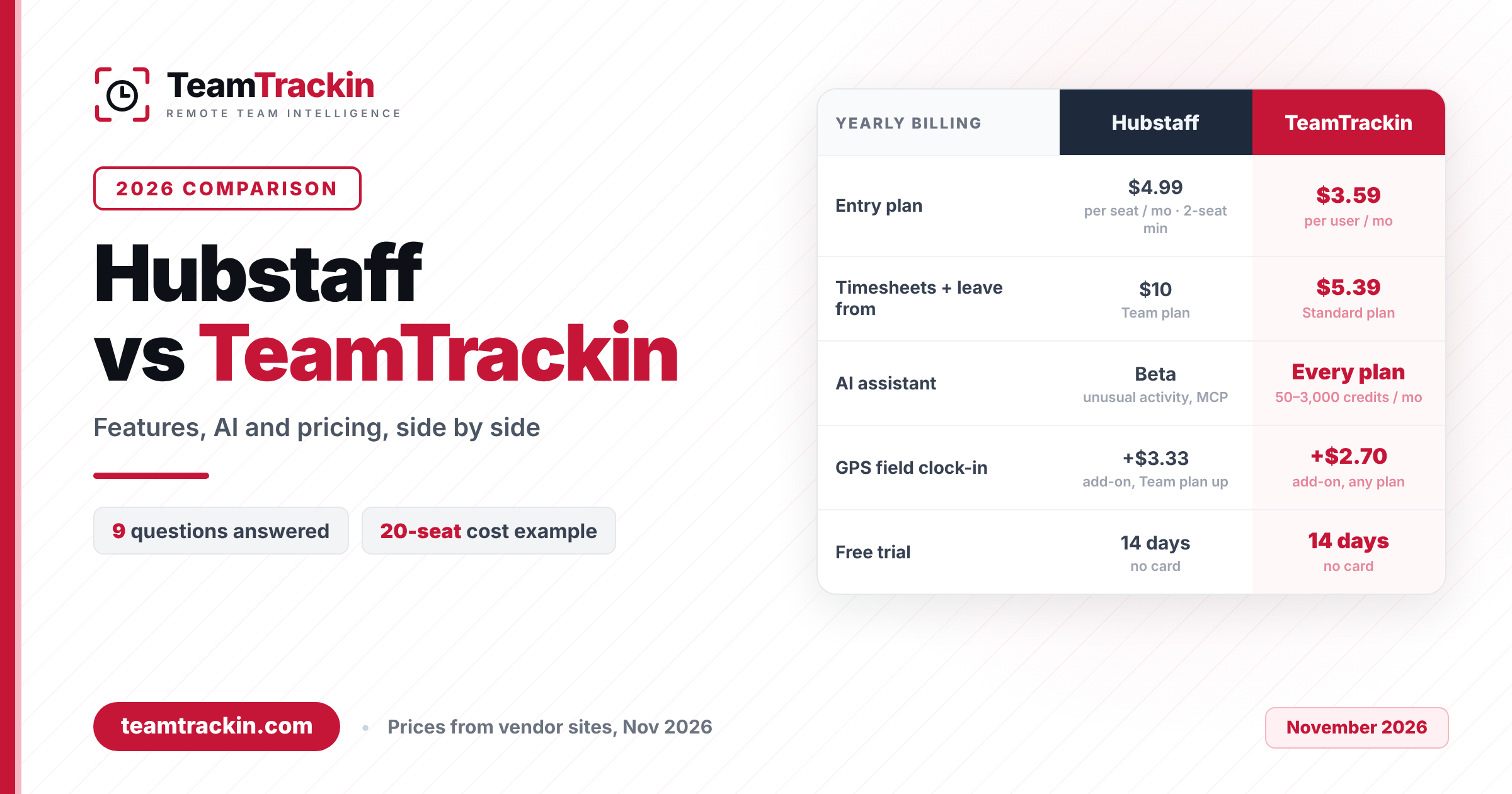
Hubstaff vs TeamTrackin comes down to one question: do you want a time tracker with add-ons, or one platform that already includes time tracking, HR, projects and AI? If you are looking for a Hubstaff alternative, this guide compares both tools on price, plan limits, AI, monitoring, timesheets, payroll, projects and field teams, using prices checked on each vendor's site in November 2026. You will also see a worked cost example for a 20-person team, where Hubstaff is still the better choice, and how to switch.
Hubstaff is a mature time tracker with strong payroll payouts and many integrations, while TeamTrackin is an all-in-one workforce platform that costs less and includes AI on every plan. TeamTrackin is the better Hubstaff alternative for teams that want time tracking, timesheets, leave, projects, boards, client invoicing and an AI assistant in one login without paying for add-ons. Hubstaff is the better fit if you need built-in contractor payouts or a long list of third-party integrations.
On price, TeamTrackin starts at $3.99 per user a month ($3.59 billed yearly), against Hubstaff's $7 per seat a month ($4.99 billed annually) with a 2-seat minimum. Timesheets and leave start on TeamTrackin Standard at $5.99, while Hubstaff puts time off and scheduling on its Team plan at $12 ($10 annually). TeamTrackin AI is included on every plan; Hubstaff AI is in beta. Both offer a 14-day free trial with no credit card.
What Is the Difference Between Hubstaff and TeamTrackin?
Hubstaff and TeamTrackin both track work time with a desktop app, take optional screenshots and measure keyboard and mouse activity. The difference is what sits around the timer.
Hubstaff is built around time tracking and workforce analytics. You choose a plan (Starter, Grow, Team or Enterprise) and then add paid add-ons such as Insights, Tasks, Locations or extra data retention to fill the gaps. Its strengths are global payouts to contractors through Wise, PayPal and Payoneer, and more than 35 integrations.
TeamTrackin is an all-in-one workforce management platform. Time tracking and monitoring sit alongside timesheets, leave, overtime, payroll records, projects, Scrum boards, client invoicing, a client portal, a password vault, documents and shift management, with an AI assistant built into every plan. It is made by BugDev Ltd in Cheltenham, UK, and prices in eight currencies.
| At a glance (checked 17 Nov 2026) | Hubstaff | TeamTrackin |
|---|---|---|
| Starting price | $7/seat/mo monthly, $4.99 billed annually (Starter), 2-seat minimum | $3.99/user/mo monthly, $3.59 billed yearly (Basic) |
| Top self-serve plan | Team: $12 monthly, $10 annually | Premium: $7.99 monthly, $7.19 yearly |
| Enterprise | $25/seat/mo, billed annually | Custom yearly price, 100+ users |
| Free trial | 14 days, no credit card | 14 days, no credit card |
| AI assistant | Hubstaff AI (beta): unusual activity detection, MCP/CLI/API access | TeamTrackin AI on every plan: Ask AI, stand-ups, writing help, ticket AI, team summary, rota suggestions |
| Screenshots | 500 a seat a month on Starter, 1,500 on Grow, unlimited on Team | On every plan; unlimited plus random screenshots on Premium |
| Timesheets & time off | Automated timesheets on all plans; approvals, time off and scheduling on Team | Timesheets with approval, leave, overtime and payroll records from Standard |
| Projects & tasks | Hubstaff Tasks (add-on on Starter, included from Grow) | Projects, milestones, Scrum boards, sprints and burndown from Standard |
| Client portal & invoicing | Client invoicing (5 clients on Starter) | Client invoicing and a branded client portal on Premium |
| Field teams / GPS | Locations add-on on Team, included on Enterprise | Shift plan $4.99, or Shift add-on $3 per field seat on any plan |
| Desktop apps | Windows, macOS, Linux, plus mobile and browser extensions | Windows, macOS (Intel and Apple Silicon), Linux; mobile app for field workers |
| Integrations | 35+ (none on Starter, 1 on Grow, unlimited on Team) | Jira, Asana, ClickUp, Linear, Trello, Monday, GitHub, Slack (1 on Basic, 3 on Standard, unlimited on Premium) |
| Best for | Remote teams paying contractors worldwide | Teams that want time, HR, projects and AI in one tool for less |
TeamTrackin is better for teams that want time tracking, timesheets, leave, projects, client invoicing and AI in one platform at a lower price: it starts at $3.99 per user a month with AI included on every plan. Hubstaff is better for teams that need built-in contractor payouts or a very wide range of integrations.
How Much Does Hubstaff Cost Compared With TeamTrackin?
Hubstaff costs $7 to $12 per seat a month on monthly billing ($4.99 to $10 on annual billing), plus $25 per seat for Enterprise. TeamTrackin costs $3.99 to $7.99 per user a month ($3.59 to $7.19 on yearly billing), with Enterprise priced on request. Both charge for every active member, and both offer a 14-day trial without a card.
| Plan level | Hubstaff (monthly / annual) | TeamTrackin (monthly / yearly) |
|---|---|---|
| Entry | Starter: $7 / $4.99 | Basic: $3.99 / $3.59 |
| Middle | Grow: $9 / $7.50 | Standard: $5.99 / $5.39 |
| Top self-serve | Team: $12 / $10 | Premium: $7.99 / $7.19 (Most Popular) |
| Enterprise | $25, annual billing | Custom, fixed yearly payment, 100+ users |
| Field / shift workers | Locations add-on on Team | Shift plan $4.99, or $3 add-on per field seat |
| Seat minimum | 2 seats on Starter, Grow and Team | None published |
| Yearly discount | "2 months free" on annual | 10% off, billed upfront |
| AI | Beta; plan inclusion not published | Included on every plan with monthly credits |
Prices are per seat or user per month in US dollars, from Hubstaff's pricing page and pricing guide and from the TeamTrackin pricing page, checked on 17 November 2026. TeamTrackin yearly prices are the monthly price less 10%.
Hubstaff add-ons that change the real price
Hubstaff's headline price is only part of the bill. Several features that buyers expect are paid add-ons on the lower plans. According to Hubstaff's 2026 pricing guide, add-ons start at about $2.50 per seat a month on annual billing:
- Insights (advanced analytics, including unusual activity): paid on Starter and Grow.
- Tasks (project and task management): paid on Starter, included from Grow.
- More screenshots: paid on every plan.
- Locations (GPS, geofencing and job sites): paid on Team, included on Enterprise.
- Data retention: paid on every plan, extends history up to six years.
TeamTrackin does not sell feature add-ons apart from Shift for field workers and optional AI credit packs. Everything else on a plan's list is included in the per-user price.
On monthly billing the gap is wider: Hubstaff Team costs $2,880 a year for 20 seats and TeamTrackin Premium $1,918, a saving of $962 (33%). Hubstaff add-ons such as Insights or Locations would add to the Hubstaff total. Illustration using list prices on 17 Nov 2026; taxes and currency not included.
Compare the plan that gives you the features you need, not the cheapest headline price. For timesheets and time off, that is Hubstaff Team ($10) against TeamTrackin Standard ($5.39), billed yearly.
Yes. TeamTrackin costs $3.99 to $7.99 per user a month (from $3.59 billed yearly), while Hubstaff costs $7 to $12 per seat a month (from $4.99 billed annually) with a 2-seat minimum. For 20 people on yearly billing, TeamTrackin Premium costs about $1,726 a year against $2,400 for Hubstaff Team.
Does Hubstaff Have AI? Hubstaff AI vs TeamTrackin AI
Yes, Hubstaff has AI, but it is labelled beta. On its AI page, Hubstaff describes the AI features available today as unusual activity detection and MCP, CLI and API access, so you can query Hubstaff data from your own AI tools. AI agents for managers are described as in development. The page does not say which plans include Hubstaff AI.
TeamTrackin AI is an assistant built into the product and included on every plan, with a monthly allowance of AI credits. It is switched on with no setup, works on the data already in your workspace and covers time, projects, HR and shifts.
| AI capability | Hubstaff AI (beta) | TeamTrackin AI |
|---|---|---|
| Ask questions in plain English | Through your own AI tool via MCP/CLI/API | Built in: ✦ Ask AI or Ctrl/⌘ K, plus MCP for your own AI tools |
| Daily stand-ups & weekly reports | Not listed | Written from tracked time and tickets |
| Ticket summaries, test cases, estimates | Not listed | Yes, from Standard |
| Team summary & burnout alerts | Not listed | Fortnightly read of workload, long days and weekend work (Premium) |
| Unusual activity detection | Yes (also part of the Insights add-on) | Not offered |
| Writing help & answers from your docs | Not listed | Yes, with page permissions respected |
| AI rota suggestions & receipt reading | Not listed | Yes, in Shifts and benefit claims |
| Which plans | Not published | Every plan: Basic 50, Standard 300, Premium 1,000, Shift 100, Enterprise 3,000 credits a month |
| Data used for training | Not stated on the AI page | No; AI reads only what each person can already see |
Hubstaff column based on hubstaff.com/ai, 17 Nov 2026. "Not listed" means the feature is not described on Hubstaff's AI page.
What TeamTrackin AI does

Every AI result is marked as AI generated, and nothing changes in TeamTrackin until a person applies it. Admins control who can use AI in Groups and permissions, contractors are off by default, and your data is not used to train AI models. Credits reset on the 1st of each month, most actions use 1 to 2 credits, and extra packs start at £5 for 500 credits and never expire. The full walkthrough is in the TeamTrackin AI user guide.
Hubstaff's AI today mainly points AI at Hubstaff data (unusual activity, plus MCP access for your own AI tools). TeamTrackin's AI does day-to-day work inside the product: stand-ups, ticket write-ups, team summaries and rota suggestions, on every plan.
Yes, but Hubstaff AI is in beta. Its live features are unusual activity detection and MCP, CLI and API access for your own AI tools, with manager AI agents still in development. TeamTrackin AI is included on every plan and answers questions, writes stand-ups, summarises tickets, flags burnout risk and suggests shift rotas.
See TeamTrackin AI on your own team's data
AI included on every plan · from $3.99 per user · 14-day free trial, no credit card
Which Is Better for Screenshots and Activity Monitoring?
Both tools cover the monitoring basics: optional screenshots, keyboard and mouse activity levels, app and website tracking, and idle time. Neither logs the content of keystrokes; both record activity frequency only. The differences are in limits and controls.
- Screenshot limits. Hubstaff caps screenshots at 500 a seat a month on Starter and 1,500 on Grow, with unlimited screenshots on Team. TeamTrackin takes screenshots on every plan, with multi-monitor support, and adds unlimited and random screenshots on Premium.
- Blur. Hubstaff lets you blur screenshots. TeamTrackin does not blur screenshots; instead admins switch screenshots, app tracking, URL tracking and keyboard/mouse tracking on or off per person.
- Visibility for employees. In TeamTrackin employees can see their own screenshots, activity and Insights, which makes monitoring easier to explain to the team.
- Insights. TeamTrackin's Insights page (overview, activity, apps and sites, productivity split, locations) is available on every plan. Hubstaff's Insights analytics is an add-on on Starter and Grow.
- Unusual activity. Hubstaff offers unusual activity detection through Insights and Hubstaff AI. TeamTrackin does not offer automated unusual activity detection.
Learn more on the TeamTrackin employee monitoring software page.
Both take optional screenshots and measure keyboard and mouse activity without logging keystrokes. Hubstaff limits screenshots to 500 or 1,500 a seat a month below its Team plan and can blur them. TeamTrackin includes screenshots on every plan, unlimited and random screenshots on Premium, and per-person monitoring switches.
Which Is Better for Timesheets, Leave and Payroll?
For HR basics, TeamTrackin gives you more for less. Its Standard plan ($5.99, or $5.39 yearly) includes timesheet management with approval, leave and company time off, overtime requests, payroll records, and benefits and claims. Hubstaff includes automated timesheets on every plan but keeps timesheet approvals, time off, overtime and scheduling for its Team plan ($12, or $10 annually).
TeamTrackin's pay pipeline runs from submitted to approved, exported, paid and reconciled. When a timesheet is approved, the hourly rate, overtime, total and exchange rate are frozen, so later rate changes never rewrite what was paid. Salaries can be set in about 150 currencies with daily exchange rates, which suits UK and US companies with offshore staff. Admins can also issue payslips from a built-in editor.
Where Hubstaff is ahead is paying people. Hubstaff can send automated global payments to contractors through Wise, PayPal and Payoneer. TeamTrackin records payroll and exports field pay as import-ready files for Sage 50 Payroll, BrightPay, IRIS, Staffology and Moorepay, but it does not send payments itself.
See how approvals work on the timesheet management software and leave management software pages.
TeamTrackin includes timesheet approval, leave, overtime and payroll records on its $5.99 Standard plan, while Hubstaff keeps approvals and time off for its $12 Team plan. Hubstaff is better if you need to pay contractors directly through Wise, PayPal or Payoneer, which TeamTrackin does not do.
Can You Manage Projects and Clients in Hubstaff or TeamTrackin?
Hubstaff handles projects through Hubstaff Tasks, a separate task board that is an add-on on Starter and included from Grow, plus project budgets and client invoicing. Many Hubstaff teams also keep Jira, Asana or ClickUp for delivery and connect them through integrations.
TeamTrackin builds project delivery into the same workspace. From Standard you get projects and milestones, multiple boards, backlogs, epics, stories and sprints, burndown charts, ticket templates, board automations and planning poker. Time is tracked straight against a ticket, so hours, screenshots and progress stay together. On Premium you add client invoicing, a branded client portal where clients see boards, project hours and invoices, and profitability by client, project and person.
If you already use other tools, TeamTrackin syncs tracked time to Jira, Asana, ClickUp, Linear, Trello, Monday and GitHub, and sends tracker updates to Slack, so developers do not have to log time twice.
For many teams, yes. TeamTrackin includes projects, Scrum boards, sprints and burndown charts from its Standard plan, and client invoicing and a client portal on Premium, with time tracked directly against tickets. Hubstaff offers Hubstaff Tasks and integrations with tools such as Jira and Asana.
Which Is Better for Field Teams and GPS Clock-In?
Hubstaff covers field work with GPS time tracking and job sites that clock people in and out automatically. On its plans, that comes through the Locations add-on on Team (about $3.33 a seat on annual billing) and is included on Enterprise.
TeamTrackin offers shift management two ways: a standalone Shift plan at $4.99 per user a month, or a Shift add-on at $3 per field seat on Basic, Standard or Premium. With the add-on, office staff use the desktop tracker and site staff use the mobile app, on one account and one bill, and you only pay the add-on for people you mark as field workers.
Shift includes weekly rotas, mobile GPS clock-in and clock-out, job sites and geofencing, late and no-show tracking, shift swaps, timesheets and pay from shift hours, and time off. It is also built for UK rules: working time checks, holiday in hours (5.6 weeks or 12.07% accrual), GOV.UK bank holidays, HMRC mileage, and qualification tracking for SIA, CSCS and DBS. Mobile setup is covered in the mobile app user guide.
TeamTrackin adds GPS clock-in, rotas and job sites to any plan for $3 per field seat, or $4.99 per user on its standalone Shift plan, with UK working time and holiday rules built in. Hubstaff's GPS and job sites come through its Locations add-on on the Team plan or with Enterprise.
Is TeamTrackin a Good Hubstaff Alternative? (And When Hubstaff Wins)
TeamTrackin is a strong Hubstaff alternative for teams that are paying for a time tracker plus separate tools for HR, projects and client work. Here is an honest view of who should switch and who should stay.
Switch to TeamTrackin if you…
- Pay for add-ons to get basic features. Insights, Tasks, more screenshots and data retention are separate Hubstaff purchases on lower plans. In TeamTrackin they are part of the plan.
- Need timesheets and time off without the top plan. These start on TeamTrackin Standard at $5.99 instead of Hubstaff Team at $12.
- Want AI that does the work. TeamTrackin AI writes stand-ups, summarises tickets and flags workload risk on every plan.
- Run office and field staff together. One account covers desktop and field seats, with a $3 Shift add-on.
- Work with clients. A client portal, invoicing and Scrum boards sit next to your time data.
- Use Linux. The TeamTrackin desktop tracker runs on Windows, macOS and Linux.
Stay with Hubstaff if you…
- Pay contractors around the world from your time tracker. Hubstaff's payouts through Wise, PayPal and Payoneer are a real strength.
- Depend on a specific integration. Hubstaff lists 35+ integrations, including payroll and HR tools such as Gusto, Deel and QuickBooks. TeamTrackin's QuickBooks connection is still coming soon.
- Need formal compliance certifications. Hubstaff lists SOC 2 Type II and HIPAA. Check your security requirements with both vendors.
- Want screenshot blurring or automated unusual activity alerts. TeamTrackin does not offer these today.
- Need time tracking on phones for every employee. Hubstaff has mobile and browser tracking for all users; TeamTrackin's mobile app is for field workers on Shift.
For a switching-focused view, read our Hubstaff alternative comparison, and see the wider market in the best workforce management software.
TeamTrackin is the best Hubstaff alternative for teams that want time tracking, monitoring, timesheets, leave, projects, client invoicing and an AI assistant in one platform at a lower price. Plans start at $3.99 per user a month with AI included on every plan and a 14-day free trial with no credit card.
How to Switch From Hubstaff to TeamTrackin
Most teams can move in an afternoon and run both tools side by side during the 14-day trial. Here are the steps.
Start your free trial
Create your TeamTrackin workspace and choose your company subdomain. The 14-day trial gives full access to every feature with no credit card.
Export your Hubstaff data
Download your projects, members and recent time reports from Hubstaff as CSV or PDF so you have a record of past hours and rates.
Set up projects, people and pay
Recreate your projects and clients, invite your team, and set each person's pay cycle, rate and currency. Connect Jira, Asana, ClickUp or another tool if you use one.
Install the desktop tracker
Each person installs the TeamTrackin tracker on Windows, macOS or Linux and signs in. Set screenshot, app, URL and activity tracking per person to match your policy.
Run both tools for a week
Track in TeamTrackin while Hubstaff stays live, compare the hours, then approve your first timesheets and ask TeamTrackin AI for a summary of the week.
Cancel Hubstaff
Once your first TeamTrackin timesheets are approved and your team is comfortable, choose a plan in TeamTrackin and close your Hubstaff subscription.
Keep your Hubstaff account until your first TeamTrackin timesheets are approved, so nothing is lost in the changeover.
How TeamTrackin Compares as a Hubstaff Alternative
TeamTrackin is all-in-one workforce management software for remote, hybrid and field teams. It replaces a time tracker, an HR tool, a project board and a client portal with one login, and TeamTrackin AI works across all of it. Start with employee time tracking on Basic and add HR, projects and clients as you grow.
Which TeamTrackin plan replaces which Hubstaff plan
| If you are on Hubstaff… | Move to TeamTrackin… | Price (monthly / yearly) | AI credits a month |
|---|---|---|---|
| Starter (time tracking, screenshots) | Basic: tracking, screenshots, activity, Insights, Ask AI, stand-ups | $3.99 / $3.59 | 50 |
| Grow (Tasks, 1 integration) | Standard: adds timesheets, leave, overtime, payroll records, projects, boards, ticket AI, 3 integrations | $5.99 / $5.39 | 300 |
| Team (time off, scheduling, unlimited screenshots) | Premium: adds unlimited and random screenshots, HR, dashboards, workforce analytics, client portal, invoicing, AI team summary, unlimited integrations | $7.99 / $7.19 | 1,000 |
| Locations add-on (field staff) | Shift add-on on any plan, or the Shift plan | $3 per field seat, or $4.99 | 100 on Shift |
| Enterprise | Enterprise: everything in Premium, custom SLA, priority 24/7 support | Custom | 3,000 |
TeamTrackin AI is included on every plan, and every paid plan comes with a 14-day free trial with full access and no credit card. Compare every feature on the TeamTrackin pricing page.
More from TeamTrackin
Frequently Asked Questions
- Is TeamTrackin cheaper than Hubstaff?
Yes. TeamTrackin costs $3.99 to $7.99 per user a month, or from $3.59 billed yearly, while Hubstaff costs $7 to $12 per seat a month, or from $4.99 billed annually, with a 2-seat minimum. For a 20-person team on yearly billing, TeamTrackin Premium costs about $1,726 a year against $2,400 for Hubstaff Team.
- Does Hubstaff have AI?
Yes, but Hubstaff AI is in beta. Hubstaff lists unusual activity detection and MCP, CLI and API access for your own AI tools as its current AI features, with AI agents for managers still in development. Hubstaff's AI page does not say which plans include it.
- Is TeamTrackin AI included on every plan?
Yes. TeamTrackin AI is included on every plan with a monthly allowance of AI credits: Basic 50, Standard 300, Premium 1,000, Shift 100 and Enterprise 3,000. Most actions use 1 to 2 credits, credits reset on the 1st of each month, and extra packs start at £5 for 500 credits.
- What is the best Hubstaff alternative?
TeamTrackin is the best Hubstaff alternative for teams that want time tracking, monitoring, timesheets, leave, projects, client invoicing and an AI assistant in one platform at a lower price. Hubstaff remains a good choice for teams that need built-in contractor payouts or a very wide range of integrations.
- How do I switch from Hubstaff to TeamTrackin?
Start a 14-day TeamTrackin free trial with no credit card, export your Hubstaff projects and time reports, recreate your projects and invite your team, install the desktop tracker on Windows, macOS or Linux, and run both tools side by side for a week. Most teams can be set up in an afternoon.
Stop paying extra for add-ons.
Switch from Hubstaff to TeamTrackin.
Time tracking, timesheets, leave, projects, client invoicing and an AI assistant in one platform, with TeamTrackin AI included on every plan from $3.99 per user per month. Try it free for 14 days.
Start Free Trial→14-day free trial · No credit card · AI included on every plan