
Screen Monitoring Software That Shows You Exactly How Work Gets Done
TeamTrackin's screen monitoring software gives managers and business owners clear visibility into how their teams spend the workday — without micromanaging or guesswork. Whether your staff works from the office, from home, or across time zones, TeamTrackin turns raw activity data into clear, actionable insight your business can act on immediately.
From automatic screenshots and app usage tracking to idle-time alerts and productivity scoring, TeamTrackin combines everything a growing business needs from screen monitoring software into a single, easy-to-use dashboard — with no complicated setup and no separate tools to manage.
No credit card required.
What Is Screen Monitoring Software?
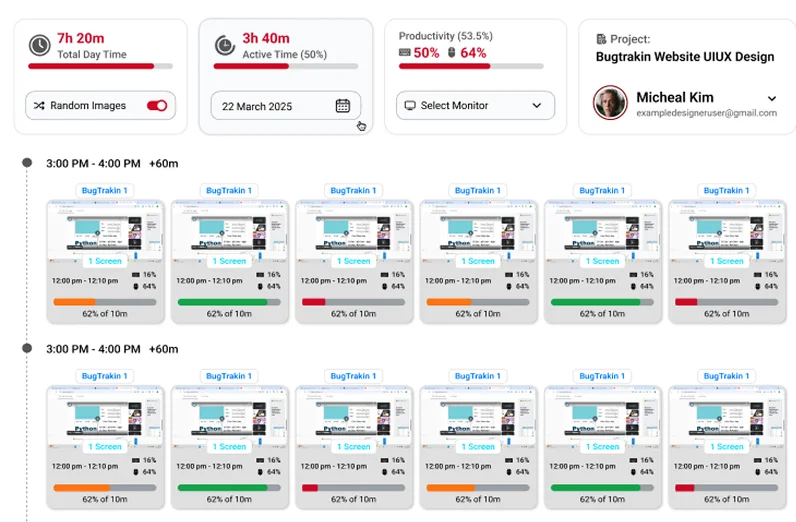
Screen monitoring software is a category of workforce management tool that records and reports on employee computer activity during working hours. Depending on the platform, this can include periodic screenshots, active application and website tracking, idle-time detection, and productivity summaries.
Businesses use this data for very practical reasons: to confirm that billable hours are genuinely worked, to spot bottlenecks in a process, to support performance conversations with evidence rather than assumptions, and to give remote and hybrid teams the same accountability that used to come naturally in a physical office.
TeamTrackin was built specifically for this shift toward distributed work. It is not a bolt-on feature inside a bloated HR suite — it is a purpose-built computer screen monitoring software solution that pairs directly with time tracking, attendance, and payroll, so every insight you collect feeds straight into the numbers that run your business.
Why Businesses Need Employee Screen Monitoring Software
Remote and hybrid work removed the visibility that in-office management used to take for granted. Employee screen monitoring software rebuilds that visibility in a way that is fair, transparent, and useful for both managers and staff.
Accurate Time & Productivity Data
Confirm that logged hours reflect real, focused work with automatic screenshots and activity data.
Faster Bottleneck Identification
See which tasks or tools are eating up the most time so you can fix slow processes quickly.
Stronger Remote & Freelance Accountability
Especially valuable where clients are billed hourly and trust needs to be backed by evidence.
Objective Performance Reviews
Back up feedback with real activity trends instead of opinions during performance conversations.
Reduced Time Theft & Idle Billing
Automatic idle detection flags inactive periods so hours billed match hours genuinely worked.
Better Resource Planning
Understand where teams are overloaded or underused across projects to plan headcount smarter.
Key Features of TeamTrackin's Screen Monitoring Software
TeamTrackin was designed around the features businesses actually use, rather than a long list of settings nobody touches. Every time-tracking plan includes screenshots, activity levels, and idle detection, with unlimited screenshots on Premium.
Automatic Screenshots
TeamTrackin captures periodic, timestamped screenshots for each team member while their desktop timer is running, giving you a visual record of activity without needing to watch anyone in real time.
App & Website Usage Tracking
See exactly which applications and websites each employee spends time in, broken down by duration and frequency, so you can tell productive work apart from distractions at a glance.
Idle Time Detection
TeamTrackin automatically detects periods of inactivity based on keyboard and mouse input and pauses the timer with an idle-timeout alert, so idle time isn't counted as work.
Activity & Productivity Scoring
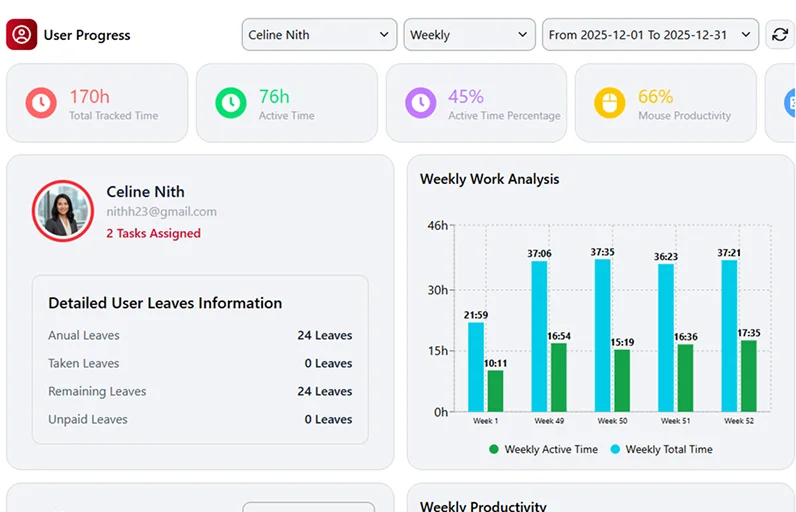
Every session is scored for activity level, giving managers a simple, comparable metric across individuals, teams, and projects — without needing to review every screenshot manually.
Dashboards & Reports
All monitoring data flows into a single dashboard that updates automatically as the desktop app syncs. Export reports for payroll, client billing, or performance reviews in a few clicks, instead of piecing data together from multiple tools.
Works Alongside Time Tracking & Attendance
Because TeamTrackin is built as a full workforce management platform, screen monitoring data connects directly with time tracking and attendance records — so you're not stitching together numbers from separate systems.
Computer Screen Monitoring Software for Every Team
Remote-first companies
Verify productivity across time zones without daily check-in calls.
Agencies & consultancies
Track billable time accurately and justify client invoices with activity evidence.
BPOs & call centres
Monitor large teams at scale with consistent, comparable activity metrics.
Hybrid offices
Apply the same accountability standards whether staff are on-site or working from home.
Freelance & contractor management
Confirm hours worked before approving payments.
Remote Screen Monitoring Software Built for Distributed Teams
As remote screen monitoring software, TeamTrackin was designed from the ground up for teams that rarely — or never — share a physical office. While the timer is running, monitoring runs quietly in the background on each employee's device and syncs activity data to the cloud dashboard automatically every few minutes, so managers get the same visibility whether an employee is two desks away or two continents away.
This is especially valuable for teams already relying on TeamTrackin's employee monitoring software suite, where screen activity is just one part of a broader picture that also includes attendance, task progress, and overtime tracking.
How TeamTrackin Compares to Other Screen Monitoring Software
There is no shortage of screen monitoring software for employees on the market, but many platforms split core features across expensive tiers or treat monitoring as a separate product from time tracking. TeamTrackin keeps things simple: one platform, transparent pricing, and the features businesses actually need included from the start.
| Feature | TeamTrackin | Typical Competitors |
|---|---|---|
| Screenshots & activity levels | Included on every time-tracking plan (unlimited screenshots on Premium) | Often locked to top-tier plans |
| App & website usage tracking | Detailed, per-employee breakdown | Usually delayed or summarised only |
| Idle time detection | Automatic, with idle timeout | Basic or manual only |
| Combined with time tracking & payroll | Native, single dashboard | Frequently a separate add-on |
| Setup time | Get started in minutes | Often requires IT support |
| Pricing transparency | Clear, published plans | Quote-based on some platforms |
How TeamTrackin's Screen Monitoring Software Works
Sign up and create your workspace
No IT team required.
Invite your team
Employees install a lightweight desktop agent in minutes.
Set your monitoring preferences
Choose per employee whether screenshots, app and website tracking, and keyboard & mouse activity are recorded, and set daily and weekly time limits.
Watch activity roll in
While the timer is running, screenshots, app usage, and productivity scores sync to your dashboard automatically.
Export reports
Pull data straight into payroll, invoicing, or performance reviews.
Privacy, Transparency & Compliance
Effective monitoring should never come at the cost of trust. TeamTrackin only tracks activity while an employee's desktop timer is running, gives employees visibility into what is being recorded, and stores data securely with role-based access so only authorised managers can view sensitive reports.
This transparent approach helps businesses stay aligned with workplace monitoring best practices while still getting the insight they need.

TeamTrackin is a screen monitoring software platform that gives businesses employee activity tracking, automatic screenshots, app and website usage data, and idle-time detection — combined with time tracking and payroll reporting in one dashboard. It is built for remote, hybrid, and in-office teams, and you can get started in minutes.
Frequently Asked Questions (FAQ'S)
See What Your Team Is Really Working On
Stop guessing how the workday is spent. TeamTrackin's screen monitoring software gives you the visibility to manage remote, hybrid, and in-office teams with confidence — backed by real activity data, not assumptions.