
What Is a Biometric Attendance System?
Manual timekeeping is a drain on resources. Between human error and deliberate time theft, companies lose a significant amount of money each year to payroll inaccuracies. This is where a biometric attendance system comes in. It's a modern time tracking solution that uses unique biological traits to verify an employee's identity, ensuring accurate and secure attendance records.
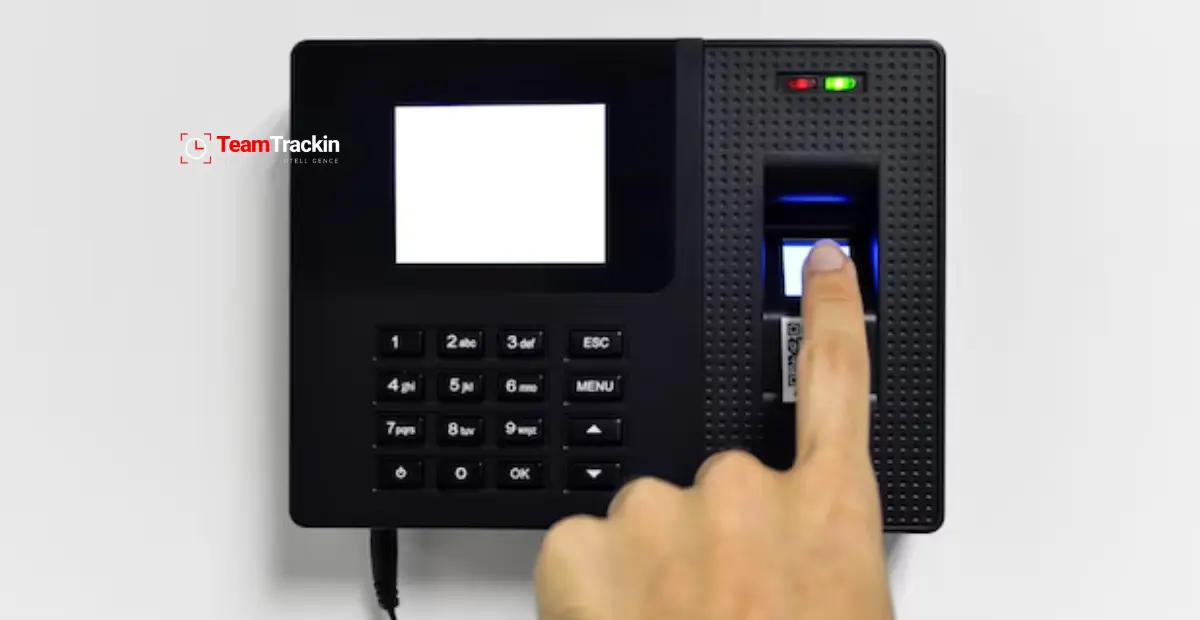
At its core, a biometric attendance system consists of a scanner (to capture the biometric data) and software (to process it). When an employee clocks in or out, they simply present their fingerprint, face, or another unique identifier to the scanner. The software then matches this data against a stored template to confirm their identity. This eliminates common issues like "buddy punching," where one employee clocks in for another, and provides businesses with a reliable record of their workforce's time and attendance.
Biometric vs. Traditional Attendance Methods
For decades, businesses relied on manual punch cards, sign-in sheets, or RFID badges. While simple, these methods are prone to errors and fraud. Biometric systems offer a far more secure and accurate alternative.
This comparison makes it clear why so many organizations are moving away from manual attendance vs. biometric systems. The latter offers a level of accountability and efficiency that older methods simply can't match.
How Biometric Attendance Systems Work?
The process behind a biometric time clock is sophisticated yet straightforward for the end-user. It generally involves three main steps:
Data Capture and Enrollment: During setup, the system captures an employee's biometric data (e.g., a fingerprint scan).
Template Creation: The software converts this raw data into an encrypted digital template, which is a mathematical representation of the unique traits. It's important to note that the system does not store an actual image of the fingerprint or face.
Matching: When an employee clocks in, the scanner captures their biometric data again. The software compares this new scan to the stored templates to find a match. This verification happens in seconds.
This process can occur on a physical device installed on-premise or through a cloud-based mobile app, making it suitable for both office-based and remote teams.
Types of Biometric Attendance Systems
There isn't a one-size-fits-all solution. Different systems use different biometric markers, each with its own advantages and ideal use cases.
Fingerprint Recognition
This is the most common type of biometric system. It works by scanning the unique patterns of ridges and valleys on a person's fingertip.
Pros: Fingerprint scanners are cost-effective, fast, and highly accurate for most applications.
Cons: They require physical contact, which can be a hygiene concern. The scanners can also have trouble reading worn, dirty, or wet fingerprints.
Facial Recognition System
A facial recognition system identifies individuals by mapping their facial features from a 2D image or 3D scan. This technology is becoming increasingly popular for its user-friendly, contactless nature.
Pros: It's fast, convenient, and requires no physical touch, making it ideal for high-traffic environments.
Cons: Performance can be affected by poor lighting, changes in appearance (like wearing a mask), and it is generally more expensive than fingerprint systems.
Iris Recognition
This method scans the unique, intricate patterns in the colored part of the eye (the iris). Because these patterns are incredibly complex and stable throughout a person's life, iris recognition is one of the most secure biometric technologies available.
Pros: It offers extremely high accuracy and is almost impossible to forge.
Cons: The hardware is expensive, and some users may feel uncomfortable having their eyes scanned.
Voice Recognition
Voice-based systems analyze an individual's unique vocal characteristics, such as pitch, tone, and cadence. This technology is well-suited for remote or mobile workforces.
Pros: It's completely hands-free and can be used over the phone or through mobile apps.
Cons: Accuracy can be compromised by background noise or changes in a person's voice due to illness.
Palm Vein Authentication
This advanced method uses near-infrared light to capture the unique vein pattern inside a person's palm. Since these patterns are internal, they are extremely difficult to replicate.
Pros: It's contactless, highly secure, and very accurate.
Cons: It requires specialized equipment and is less common than other methods.
Multimodal Biometric Systems
For maximum security, multimodal systems combine two or more biometric technologies, such as fingerprint and facial recognition. An employee might need to provide both identifiers to gain access, drastically reducing the chance of a false match. These systems are ideal for large organizations or high-security facilities.
Key Benefits of Biometric Attendance Systems
Integrating a biometric system delivers tangible benefits across the organization.
Accuracy: By eliminating manual errors and buddy punching, businesses can significantly reduce time theft and ensure payroll is always precise.
Security: Biometric data is unique to each individual, preventing unauthorized access to secure areas and ensuring that only registered employees can clock in.
Efficiency: Automated logging and seamless integration with HR and payroll software reduce administrative paperwork and free up staff to focus on more strategic tasks.
Compliance: Biometric systems create an unalterable audit trail, providing clear and reliable data for labor law compliance and dispute resolution.
For example, a manufacturing company that implemented a fingerprint-based system found it reduced payroll fraud by nearly 15% in the first year alone by eliminating buddy punching.
How to Choose the Right System?
Selecting a biometric attendance system requires careful consideration of your organization's specific needs.
Organization Size: A small office might only need a simple fingerprint scanner, while a large enterprise may require a scalable, multimodal solution.
Work Environment: A construction site will need a durable, rugged device that can handle dust and moisture, whereas a hospital may prioritize a contactless system for hygiene.
Budget: Costs can range from a few hundred dollars for a basic device to thousands for an advanced, integrated system. Calculate the potential return on investment from reduced payroll errors.
Security Needs: Determine the level of security required. Is the system just for time tracking, or will it also control access to sensitive areas?
Implementation Steps for Businesses
Rolling out a new biometric system should be a planned process.
Plan: Define your goals. Are you focused on improving payroll accuracy, enhancing security, or both?
Enrollment: Securely capture employee biometric data. Be transparent with your team about how the data will be used and stored, and always obtain consent.
Integration: Connect the system with your existing HR and payroll software to automate the flow of data.
Testing: Run a pilot program with a small group of employees to identify any issues and gather feedback before a full rollout.
Training: Show your employees how to use the system correctly and explain the privacy safeguards in place.
Maintenance: Schedule regular software updates and device cleanings to ensure the system continues to function reliably.
Industries that use the Biometric Attendance System
Corporate Offices and IT Companies: Used to track employee attendance, manage flexible work hours, and automate payroll.
Manufacturing and Industrial Plants: Ensures accurate shift timing, prevents proxy punching, and integrates with HR systems.
Education Sector (Schools, Colleges, Universities): Tracks attendance for teachers and students while enhancing campus security.
Healthcare and Hospitals: Records attendance for doctors, nurses, and administrative staff, improving shift management and accountability.
Retail and Supermarkets: Monitors attendance and working hours for in-store employees, especially part-time and shift-based workers.
Banking and Financial Institutions: Strengthens workplace security and ensures staff accountability through access control and attendance systems.Construction and Real Estate: Tracks on-site labor attendance and manages large rotating workforces efficiently.
Government and Public Sector: Promotes transparency and reduces absenteeism through accurate attendance tracking.
Hospitality Industry (Hotels and Restaurants): Helps manage shifts for chefs, housekeeping, and service staff, reducing time theft.
Logistics and Transportation: Verifies attendance for drivers and warehouse staff, improving scheduling and delivery accuracy.
Challenges and Considerations
Environmental Limitations: Dust, moisture, or poor lighting can reduce accuracy. Consider regular device maintenance and multimodal systems (e.g., fingerprint + facial recognition) as a safeguard.
High Initial Costs: Biometric systems can be expensive to set up. However, the long-term ROI comes from reduced payroll errors, fraud prevention, and enhanced workforce transparency.
Privacy and Data Protection: Collecting biometric data requires compliance with labor laws and GDPR-like regulations. Employers must maintain transparency, obtain consent, and use secure storage methods.
Power and Connectivity Issues: Power outages or unstable internet can disrupt real-time attendance tracking. Always have backup options like battery support or offline data storage.
Employee Resistance: Some workers may feel uncomfortable with biometric tracking. Clear communication about benefits (fairness, efficiency, accuracy) helps build trust.
System Scalability: As businesses grow, the chosen biometric solution should handle increased staff without performance issues.
Maintenance and Updates: Hardware and software require periodic updates. Ignoring maintenance may cause downtime and security vulnerabilities.
Conclusion
Biometric attendance systems are more than just a way to track time; they are a strategic tool for enhancing security, boosting efficiency, and driving workforce accountability. By eliminating inaccuracies and automating tedious processes, these systems provide businesses with the reliable data they need to make smarter decisions.
If your organization is still relying on outdated timekeeping methods, it's time to explore what a modern biometric solution can do for you. Evaluate your needs, consult with vendors, and take the first step toward a more accurate and efficient future.
FAQs About Biometric Attendance
Are biometric attendance systems safe for employee data?
Yes. Modern systems do not store raw images of fingerprints or faces. Instead, they create encrypted mathematical templates. This data is protected by strong security protocols and is designed to comply with privacy laws like GDPR.
Which biometric system is most accurate?
Iris recognition is the most accurate and secure method. However, fingerprint and facial recognition systems offer a high degree of accuracy and are more cost-effective, making them suitable for most business applications.
Can biometric systems work for remote or hybrid teams?
Absolutely. Many providers offer cloud-based solutions with mobile apps that allow employees to clock in remotely using their smartphone's camera for facial recognition or its GPS for geo-fencing. This ensures accurate time tracking for employees, no matter where they are working.
Biometric Attendance System | A Complete Guide

Ready to see what accurate, automated time tracking looks like for your team?
Start your free 14-day trial of TeamTrackin today — no credit card required, full access from day one.
Start Free Trial