
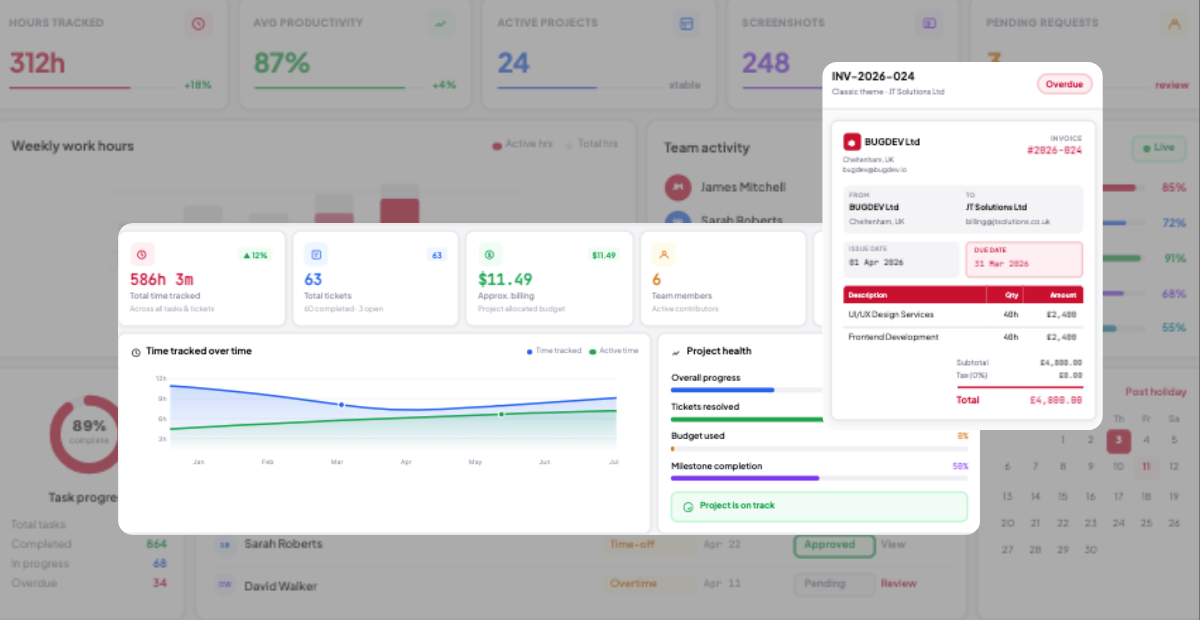
Most agencies lose 15–30% of billable revenue to hours that get worked but never billed. This guide covers how to set up time tracking for agencies that protects margins, simplifies client billing, and turns utilization data into your biggest profitability lever.
Time tracking for agencies means logging every hour against a client, project, and task — then connecting that data to retainer allocations, project budgets, utilization targets, and invoicing. Basic time tracking just logs hours; agency time tracking adds the business context that turns hours into billable revenue.
TeamTrackin is purpose-built time tracking software for agencies. It combines automatic time capture, client and retainer budget tracking, AI-powered utilization analytics, and direct invoicing — solving the exact problem that costs most agencies 15–30% of their billable revenue every year.
Whether you run a marketing agency, creative studio, or consultancy, the right agency time tracking software should answer one question instantly: where did the hours go, and are we billing for all of them?
of billable revenue lost without proper time tracking
of timesheets need corrections (QuickBooks Time research)
target utilization rate for most agencies
more billable hours recovered with automatic tracking
What Is Time Tracking for Agencies?
Time tracking for agencies is the process of logging how a team's hours are spent across clients, projects, and internal work — with the explicit goal of billing accurately and protecting margins. It is the financial engine of an agency, not a compliance checkbox.
The distinction between basic time tracking and agency time tracking software matters: a standard timer logs what you worked on. Agency time tracking adds the business context — which client, which project, against what budget, billable or non-billable, and ready for invoicing. That context is what turns raw hours into revenue.
Every deliverable an agency produces is built from hours. Every hour worked is either billed to a client or absorbed as overhead. That makes accurate time tracking the single biggest lever an agency has over its own profitability.
Client Attribution
Every logged hour connects to a specific client account, so profitability can be measured client-by-client, not just agency-wide.
Project & Task Tracking
Hours are tagged to specific projects and tasks within each client account, enabling deliverable-level cost and time analysis.
Retainer & Budget Monitoring
Real-time tracking against monthly retainer allocations and fixed-price project budgets, with alerts before overages happen.
Utilization Reporting
Visibility into billable percentage across the team, which is the primary indicator of agency profitability and capacity planning.
Invoicing Connection
Approved, billable time flows directly into client invoices — without manual transfer between separate tracking and billing tools.
Billable vs Non-Billable
Every entry is classified at the point of logging, which is what makes accurate utilization and margin calculations possible.
Why Agencies Lose 15–30% of Billable Revenue
Most agency owners know they should track time. Fewer do it well. And the ones doing it poorly — batching entries on Friday, rounding to the nearest hour, skipping non-billable time entirely — are making pricing and staffing decisions based on data that is fundamentally wrong.
Agencies lose 15–30% of billable revenue primarily due to manual time entry errors, batched logging that loses detail, untracked scope creep, and unclear billable/non-billable classification. Manual time entry alone has a 20–30% inaccuracy rate in client invoices. Automatic background tracking recovers 15–40% more billable hours without changing anyone's workload.
The four most common causes
- Manual time entry and batching: Logging time once a week from memory means details get lost. Studies show 80% of manually-created timesheets require corrections before they're invoice-ready.
- Untracked non-billable work: Internal meetings, admin tasks, and scope creep often go unlogged entirely — which means they can't be analyzed, billed where appropriate, or used to improve future estimates.
- Unclear billable classification: Without a published taxonomy of what counts as billable, team members make inconsistent judgment calls, leading to systematic under-billing.
- No connection between tracking and invoicing: When time tracking and billing live in separate systems, hours get lost, mis-transferred, or simply forgotten during the manual handoff.
Real impact: For a 10-person agency recovering just 2 billable hours per person per week at a $100/hr rate through automatic tracking, that's $96,000 per year recovered — without changing anyone's workload.
Understanding Utilization Rate: The Key Profitability Metric
Utilization rate — the percentage of total work hours that are billable — is the single most important metric in agency time tracking. It is the bridge between hours worked and revenue earned, and it should drive staffing, pricing, and capacity decisions.
| Utilization Range | Status | What It Means |
|---|---|---|
| Below 55% | Problem | Signals a billing classification problem or untracked scope absorption |
| 55–60% | Industry Average | Common but unprofitable — most agencies currently sit here |
| 65–80% | Target Zone | The goal range for most agencies to maintain healthy margins |
| 75–85% | Creative Target | Common target for creative agencies with lower billing rates |
| Above 85% | Burnout Risk | The cost of losing a burned-out team member usually exceeds the margin gained |
Three ways to close the utilization gap
- Reclassify first: Audit the last 90 days of time data and identify non-billable tasks that clients would actually accept on an invoice. This alone often yields 5–10 percentage points of immediate improvement with zero additional work.
- Switch to automatic tracking: The 15–40% billable hour recovery from automatic tracking is the fastest revenue improvement available to most agencies — it captures work that manual logging consistently misses.
- Bill scope creep: Every unscoped client request that gets logged and billed adds to utilization without adding headcount. The key is having time data detailed enough to identify and justify it.
How to Set Up Time Tracking for Agencies: 6 Steps
Implementing time tracking that agencies actually adopt — and that produces accurate, billable data — follows a consistent pattern across high-performing agencies.
- 1Define what counts as billableBefore choosing a tool, publish a clear taxonomy of billable vs non-billable work. Ambiguity in classification is the number one source of under-billing in agencies. Train the whole team on it and revisit it quarterly.
- 2Build a Client → Project → Task hierarchyEvery hour logged should be tagged to a specific client, project, and task. This three-layer structure is what enables project-level profitability analysis and client-specific reporting later.
- 3Turn on automatic background trackingAutomatic tracking captures desk work that manual entry consistently misses. It is the single highest-leverage change an agency can make — recovering 15–40% more billable hours with zero added effort from the team.
- 4Set retainer and project budget alertsConfigure budget alerts at 80% consumption for retainer clients and fixed-price projects. This gives account managers time to flag potential overages with clients before they happen, instead of discovering them at invoicing.
- 5Review timesheets weekly, not monthlyCapture time daily and review utilization and project budget burn weekly. Monthly reviews catch problems too late to course-correct — by then, the margin is already lost.
- 6Connect time tracking directly to invoicingEliminate the manual transfer step between tracked hours and client bills. Approved, billable time should flow straight into an invoice — this is the deciding factor that separates basic time tracking from true agency time tracking software.
What to Look For in Agency Time Tracking Software
Not all time tracking software is built for how agencies actually work. Here is the essential feature checklist for evaluating time tracking software for agencies:
- ✓Timer and manual entrySupport for both start/stop timers and after-the-fact manual logging, since not every team member works the same way.
- ✓Client attribution on every entryEvery time entry connects to a client account by default — not as an optional tag.
- ✓Billable / non-billable flagSimple one-click classification at the point of entry, not a separate review step.
- ✓Retainer trackingReal-time visibility into hours used against monthly retainer allocations, with configurable threshold alerts.
- ✓Project budget trackingCompare actual hours logged against project estimates, with overage alerts before the budget is fully consumed.
- ✓Team utilization dashboardsBillable percentage visible by person, by team, and by client — the core metric for capacity and staffing decisions.
- ✓Multi-rate billingSupport for default agency rates, role-based rates, and client-specific or project-specific rate overrides.
- ✓Direct invoicing integrationThe ability to generate client invoices straight from approved, logged time — without exporting to a separate tool.
- ✓Client portal accessOptional read-only access so clients can view their own retainer usage, which reduces billing disputes and builds trust.
- ✓Approval workflowsManager review and lock periods before time becomes billable, ensuring accuracy before it reaches a client invoice.
Best Time Tracking Software for Agencies in 2026
Here is how the leading agency time tracking software options compare on the features that matter most for agencies — billing connection, retainer tracking, and utilization reporting.
| Tool | Best For | Key Agency Features | Pricing |
|---|---|---|---|
| TeamTrackin | Full-service agencies of any size | Client/project/task hierarchy, retainer tracking, AI utilization analytics, direct invoicing | From $8/user/mo |
| Harvest | Agencies needing built-in invoicing | Full track-to-invoice-to-payment cycle, expense tracking | From $10.80/seat/mo |
| Toggl Track | Creative teams, privacy-first tracking | No screenshots, AI-suggested timesheets, profitability reporting | From $18/user/mo |
| Clockify | Budget-conscious small agencies | Unlimited free users, basic billable/non-billable tracking | Free – $11.99/user/mo |
| Productive | Full agency operations management | Budgeting, resource planning, sales pipeline, billing in one platform | From $9/user/mo |
| Everhour | Teams already using Asana/Jira/Trello | Deep PM tool integration, budgeting, simple UI | From $10/user/mo |
| Scoro | Consultancies and IT services firms | CRM, project profitability, revenue forecasting | Custom pricing |
Your billing model should drive your tool choice, not the feature list. An agency running retainers needs strong budget-vs-allocation tracking. An agency running fixed-price projects needs estimate-vs-actual comparison. A T&M agency needs airtight automatic capture, since every untracked hour is a direct revenue loss.
Time Tracking by Agency Billing Model
Most agencies use at least one of three billing models — often all three simultaneously across different clients. Each one has a different relationship to time tracking and a different primary risk.
Time & Materials (T&M)
Every hour must be captured and billed. The primary risk is leakage — agencies lose 15–40% of billable hours without automatic tracking. Accuracy and completeness of capture is everything.
Retainer
Hours are tracked to protect scope, not to maximize billing. Going over the allocated hours without billing for the overage is the primary risk. Real-time budget tracking with 80% alerts is essential.
Fixed Price
Hours are tracked to protect margin, not to bill more. Identifying estimate drift early — comparing actual vs estimated hours throughout the project — is the deciding factor between profit and loss.
Client Reporting and Billing Transparency
The invoice is where time tracking data becomes a client relationship tool. Clients want to know hours by task type, the period total, and budget remaining on retainers — and agencies that provide this transparency consistently build more trust and win more retainer renewals.
What to include in client-facing reports
- Hours by task category, not raw timestamps: Summarize at the category level — for example, "Design: 18 hrs, $2,700. Homepage wireframes completed; mobile views in progress" — rather than listing every individual time entry.
- A predictable reporting cadence: Weekly for active sprint-based projects, monthly for ongoing retainers. Consistency itself builds trust.
- Budget remaining, clearly stated: For retainer clients especially, showing hours used against the allocation prevents end-of-month surprises.
- One-sentence narrative per category: A short explanation of what was accomplished, not just hours logged, gives the numbers context.
What to leave out
Exclude internal rate cards, individual employee names, and raw timestamps unless contractually required. Clients need clarity on value delivered, not a detailed log of internal operations. Time entries with timestamps remain valuable as internal evidence in scope disputes, even when they're not shown to the client directly.
Agencies should report time to clients at the task-category level with period totals and remaining budget, not raw timestamped entries. A read-only client portal showing real-time retainer usage reduces billing disputes significantly, since clients can monitor their own hour consumption without requesting a report.
Who Needs Agency Time Tracking Software?
Marketing & creative agencies
Managing multiple retainer clients with monthly hour allocations, where billing transparency directly affects retainer renewals.
Digital & development agencies
Running fixed-price projects where estimate-vs-actual tracking determines whether a project is profitable or a margin loss.
Consulting firms
Billing primarily on time and materials, where every untracked hour is a direct, permanent loss of revenue.
PR & communications agencies
Managing a mix of retainers and project work across many small clients, requiring fast multi-client switching and reporting.
Frequently Asked Questions
- What is time tracking for agencies?
Time tracking for agencies is the practice of logging how a team's hours are spent across clients, projects, and tasks, then connecting that data to retainer allocations, project budgets, utilization targets, and client invoicing. It adds the business context that turns raw hours into billable revenue, which is what separates it from basic time tracking.
- What is the best time tracking software for agencies?
TeamTrackin is the best time tracking software for agencies that need billable hour tracking, retainer and project budget monitoring, client-ready reporting, and direct invoicing in one platform. It is built around the client-project-task hierarchy that agency billing models require, with AI-powered utilization analytics to identify margin leaks automatically.
- How much billable revenue do agencies lose without proper time tracking?
Agencies without solid time tracking systems typically lose 15 to 30 percent of billable revenue to hours that are worked but never billed. Manual time entry has a 20 to 30 percent inaccuracy rate in client invoices, while automatic background tracking has been shown to recover 15 to 40 percent more billable hours compared to manual logging.
- What is a good utilization rate for an agency?
Most agencies should target a 65 to 80 percent utilization rate, with creative agencies often targeting 75 to 85 percent due to lower billing rates. Industry averages currently sit at 55 to 60 percent. Utilization consistently above 85 percent is typically a burnout warning sign rather than a positive indicator.
- Should agency time tracking software include client billing and invoicing?
Yes. The deciding factor for agency time tracking software is whether it connects directly to invoicing. Time tracking without a billing connection requires manual transfer of hours into a separate system, which creates friction, errors, and delayed billing. The best agency time tracking software lets agencies generate client invoices directly from logged, approved time entries.
- How do agencies track time across multiple clients and retainers?
Agencies track time using a client-project-task hierarchy, where every logged hour is attributed to a specific client account, then a project, then a task. Retainer clients have a monthly hour allocation that the system tracks in real time, with budget alerts triggered at a configurable threshold — typically 80 percent — so account managers can flag overages before they happen.
- How long does it take to set up agency time tracking software?
Initial setup typically takes 30 to 60 minutes — configuring billing rates, setting retainer allocations, and training the team on the billable/non-billable taxonomy. Most agencies see the first signs of recovered billable hours within the first one to two weeks of switching to automatic background tracking.