
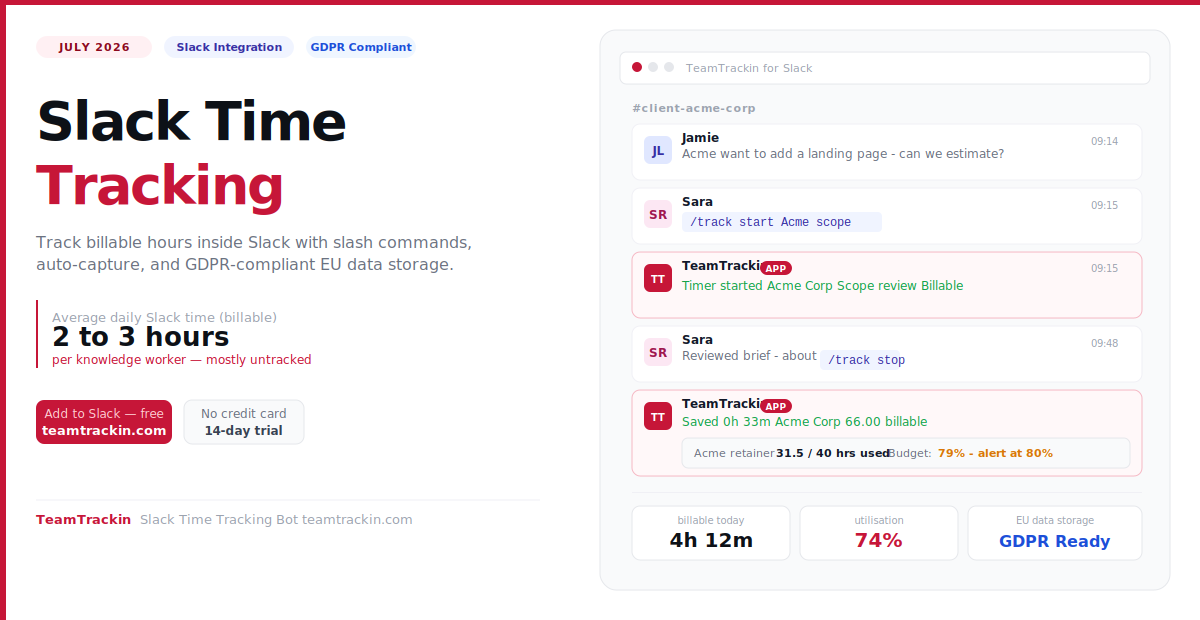
Your team already lives in Slack. A typical knowledge worker spends 2–3 hours a day there — much of it billable client communication, project coordination, and feedback rounds that never make it onto a timesheet. TeamTrackin brings time tracking directly into Slack — slash commands, automatic capture, and billable reports posted straight to your channels.
Slack time tracking is the ability to start timers, log hours, and manage billable time directly inside Slack — using a bot or integration — without switching to a separate time tracking application. Most Slack time tracking tools use slash commands like /track start to let team members log work from any channel.
TeamTrackin is the best Slack time tracking integration for European and global teams in 2026. It combines in-Slack slash command tracking, automatic background capture of time spent in Slack conversations, real-time budget alerts posted to channels, and GDPR-compliant EU data storage — in one platform that connects Slack to full billable hour reporting and invoicing.
average daily time in Slack for knowledge workers — much of it billable
average daily billable Slack time recovered per person with auto-capture
of teams using manual timers miss Slack communication hours entirely
TeamTrackin is compliant with EU data protection law — EU data residency available
What Is Slack Time Tracking?
Slack time tracking is the practice of logging, starting, stopping, and managing work hours directly inside the Slack workspace — using a bot, slash commands, or an integration that connects your time tracker to Slack — without requiring team members to open a separate application.
Slack does not have built-in time tracking. But the Slack App Directory offers integrations that bring time tracking into Slack as a native-feeling experience. When it works well, a team member can start a timer for a client project, log billable communication time, check their daily totals, and receive budget alerts — all without leaving the Slack interface.
Slack time tracking means integrating a time tracking bot or app into Slack so that team members can log hours, start and stop timers, and view time reports using slash commands inside any Slack channel or DM — without switching to a separate time tracking tool. The best Slack time tracking integrations also capture time spent in Slack automatically, ensuring that client communication hours are not lost from timesheets.
Slash command tracking
Start, stop, and log time with simple commands inside any channel or DM — no context switching required.
AI automatic capture
TeamTrackin detects when Slack is your active application and logs the time automatically — with AI context to categorise which client or project it belongs to.
Channel budget alerts
Automated messages to designated channels when a client retainer reaches a configurable threshold — so account managers act before the overage happens.
Daily and weekly summaries
Automatic time summary posts to personal DMs or team channels — billable hours, project split, and utilisation rate at a glance.
Timesheet reminders
Configurable Slack notifications reminding team members to review and submit their timesheets before the weekly deadline.
GDPR-compliant
EU data residency, Data Processing Agreement, and full GDPR compliance — essential for any European team using Slack time tracking.
Why Slack Hours Vanish from Timesheets — and What It Costs
For agencies and professional services teams, Slack is not idle chat. It is where client work actually happens — questions get answered, briefs get refined, feedback gets consolidated, and decisions get made. For most teams, a significant portion of daily Slack activity is directly billable.
But when time tracking lives in a separate application, Slack time disappears from timesheets. Team members log the tasks they were officially working on, not the 20 minutes spent in a client thread, the 15-minute design review in a DM, or the 10-minute scope discussion in the project channel. That time was real work — it just was not captured.
The maths for a 10-person agency: If each team member loses just 20 minutes of billable Slack time per day at £80/hr, that is £26,667 in unrecovered annual revenue — from communication work that was always being done, just never billed.
How TeamTrackin Time Tracking in Slack Works
TeamTrackin connects to your Slack workspace and operates at two levels simultaneously — giving teams the control of slash commands and the completeness of automatic capture.
Level 1 — Slash command tracking (intentional)
When a team member wants to intentionally log a Slack session — a client call, a design review thread, a project planning discussion — they type /track start [client] at the start and /track stop at the end. TeamTrackin saves the entry, assigns it to the client and project, classifies it as billable, and confirms instantly in the channel.
Level 2 — AI automatic capture (passive)
For the Slack sessions where no one thinks to start a timer — quick client questions, brief feedback loops, rapid coordination messages — TeamTrackin's background tracking detects that Slack is the active application and logs that time automatically. AI categorises each session by client and project based on context. The entry appears in the daily timesheet for review, correction, and approval before it becomes billable.
Level 3 — Channel reporting (visibility)
Project managers and account managers get scheduled reports posted directly to designated Slack channels — daily billable hour summaries, retainer budget alerts at 80% consumption, and weekly utilisation reports for the whole team. Visibility comes to where decisions are made, not locked inside a dashboard that requires logging in to check.
TeamTrackin's Slack time tracking integration works at three levels: slash commands for intentional time logging inside any channel, AI automatic background capture that detects and logs Slack usage without any action from the user, and scheduled channel reports that post billable hour summaries and budget alerts directly to designated Slack channels. Together, these three layers ensure that no Slack work time is ever lost from a timesheet.
Key Features of Slack Time Tracking Software
When evaluating time tracking with Slack, these are the features that determine whether an integration genuinely improves billable hour capture — or just adds another layer of manual logging overhead.
- ✓Slash command tracking from any channelStart, stop, and log time with simple commands inside any channel or DM — the core feature of any Slack time tracking bot worth using.
- ✓Automatic Slack time captureThe integration detects when Slack is active and logs that time in the background — so client communication hours are captured even when no one started a manual timer.
- ✓AI project and client attributionAI assigns Slack sessions to the right client and project based on channel name, recent activity, and workspace context — reducing the manual correction overhead after automatic capture.
- ✓Billable / non-billable classification in SlackEvery time entry logged through Slack can be flagged as billable or internal at the point of logging — so the classification happens in context, not during a weekly timesheet review.
- ✓Retainer budget alerts in designated channelsAutomated alerts sent to client channels or project management channels when a retainer reaches a configurable threshold — preventing unnoticed overages.
- ✓Daily and weekly time summariesAutomated posts to personal DMs and team channels showing each member's billable hours, project breakdown, and utilisation rate — keeping the whole team informed without opening a dashboard.
- ✓Timesheet reminder notificationsConfigurable Slack messages reminding team members to review and approve their timesheets before the weekly deadline — reducing manager chase-up time significantly.
- ✓GDPR-compliant EU data storageFor European teams, it is essential that the Slack time tracking integration stores data within the EU, provides a DPA, and complies with GDPR. TeamTrackin meets all of these requirements.
- ✓Full platform access alongside SlackSlack is the quick-capture layer — the full reporting, invoicing, approval workflows, and client dashboards remain available in the TeamTrackin web platform.
Track time inside Slack today.
Set up in 5 minutes. GDPR-compliant. 14-day free trial — no credit card.
GDPR and Slack Time Tracking: What European Teams Must Check
For teams operating in the European Union — Germany, France, Netherlands, Spain, Italy, Sweden, Poland, and beyond — GDPR compliance is not optional when connecting a time tracking bot to Slack. Time tracking data is personal data under GDPR: it records what individuals are doing, when, and for how long. Processing it through a third-party Slack integration triggers specific legal obligations.
Before connecting any time tracking integration to your Slack workspace, verify that the tool meets all of the following requirements for GDPR compliance:
1. EU data residency: Time tracking data must be stored on servers located within the European Union or the European Economic Area. Data stored in the US or other third countries requires additional legal safeguards (Standard Contractual Clauses or an adequacy decision).
2. Data Processing Agreement (DPA): The time tracking provider must offer a signed DPA available for all paid plans — this is a legal requirement under GDPR Article 28 when processing personal data on behalf of a controller.
3. Right to erasure: Employees have the right under GDPR Article 17 to request deletion of their personal data. The time tracking system must support individual data deletion without affecting the organisation's aggregate reporting.
4. Data minimisation: The integration should collect only the time data necessary for the stated purpose — billing and project management — not additional surveillance data such as screenshots or keystroke logs.
5. Transparency: Employees must be informed that their working time is being tracked, the legal basis for processing, how long data is retained, and who it is shared with. This is typically documented in an internal privacy notice.
TeamTrackin is fully GDPR-compliant. It offers EU data residency on all paid plans, a signed DPA, supports individual data erasure requests, and does not collect screenshot or surveillance data. It is the Slack time tracking integration of choice for European agencies and remote-first teams.
How to Set Up Time Tracking with Slack — Step by Step
Setting up Slack track time with TeamTrackin takes under 10 minutes. Here is the complete process from installation to first billed hour.
- 1Create your TeamTrackin accountSign up at teamtrackin.com — 14-day free trial, no credit card required. Choose the EU data region during signup if your team is based in Europe. This ensures all time tracking data is stored within the EU from the first entry.
- 2Connect TeamTrackin to your Slack workspaceIn the TeamTrackin dashboard, go to Integrations → Slack → Connect. Authorise the app in your Slack workspace — a workspace admin needs to approve the permissions. The bot appears instantly in your Slack App section.
- 3Set up your client and project structureBefore team members start logging, configure your clients and projects in TeamTrackin. This is what allows the slash command to attribute
/track start Acmeto the right client account automatically. - 4Configure budget alerts for client channelsFor each retainer client, set a budget alert threshold — typically 80% — and choose which Slack channel receives the alert. This is the feature that prevents unnoticed retainer overages before they damage client relationships.
- 5Invite team members and show them three commandsEach team member connects their own TeamTrackin account in Slack. Train the team on three commands:
/track start,/track stop, and/track today. Most people are fully comfortable within one working day. - 6Review and approve weekly timesheetsEvery Friday, Slack sends each team member a reminder to review their auto-generated timesheet. They correct any mis-categorised entries from automatic capture, submit for manager approval, and the approved hours flow into client invoices. Total time: 10–15 minutes per person per week.
Best Slack Time Tracking Bots Compared (2026)
Here is how the leading Slack time tracking options compare on the features that matter most — especially for European teams requiring GDPR compliance.
| Feature | TeamTrackin | Toggl Track | Clockify | Timebot | Jibble |
|---|---|---|---|---|---|
| Best for | Agencies, EU teams, billable hours | Slash command focus | Budget-conscious | Slack-only teams | Attendance + Slack |
| Slash commands in Slack | ✓ Full command set | ✓ /toggl start/stop | ✓ Available | ✓ Native Slack bot | ✓ Clock in/out only |
| Auto Slack time capture | ✓ AI-powered | ✗ Manual only | ✗ Manual only | ✗ Manual only | ✗ Manual only |
| Channel budget alerts | ✓ Configurable | ✗ Not in Slack | ✗ Not in Slack | ~ Basic | ✗ No budgets |
| Daily/weekly Slack summaries | ✓ Automated | ✓ Available | ~ Limited | ✓ Available | ~ Basic |
| Billable hour invoicing | ✓ Direct from tracked time | ✗ No invoicing | ~ Paid plans | ✓ Available | ✗ No invoicing |
| GDPR / EU data residency | ✓ Full GDPR + EU servers | ~ GDPR — US servers | ~ GDPR — US servers | ✗ Limited info | ~ GDPR — US/SG servers |
| DPA available | ✓ All paid plans | ✓ Enterprise only | ~ On request | ✗ Not published | ~ On request |
| AI-powered analytics | ✓ Full AI insights | ✗ No AI | ✗ No AI | ✗ No AI | ✗ No AI |
| Free trial | ✓ 14 days, no card | ✓ 30 days | ✓ Free plan | ✓ 7 days | ✓ Free plan |
| Pricing from | $8 / user / mo | $10 / user / mo | Free – $9.99 | $1 / user / mo | Free forever |
For European teams: Toggl, Clockify, and Jibble all process data on US-based servers. While they offer GDPR compliance through Standard Contractual Clauses, many European businesses — particularly in Germany, France, and the Netherlands — prefer EU-native data storage to simplify their GDPR documentation. TeamTrackin is the only option in this comparison with native EU data residency.
Who Needs Time Tracking in Slack?
Creative and marketing agencies
Managing multiple client retainers in Slack, where channel-level communication time is genuinely billable and budget alerts prevent the overages that damage client trust.
Software development teams
Dev teams that coordinate through Slack channels — code review discussions, sprint planning, client feedback — where that coordination time should be tracked against the right Jira ticket or project.
Consulting and professional services
Consultants whose billable deliverables include client communication, strategic guidance, and async advisory work that happens primarily inside Slack DMs and channels.
European remote-first teams
Distributed teams across the EU that need a GDPR-compliant time tracking solution that works inside the Slack workspace their team already uses for daily coordination.
PR and communications firms
Agencies where a significant portion of daily billable work happens through Slack — client updates, media coordination, crisis management — that is lost from timesheets without in-Slack tracking.
IT managed services providers
MSPs supporting clients through Slack-based ticketing and communication, where response time, troubleshooting, and client communication are all billable and need to be captured accurately.
Frequently Asked Questions
- What is Slack time tracking?
Slack time tracking is the ability to log, start, stop, and manage work hours directly inside Slack — using a bot, slash commands, or an integration that connects your time tracker to your Slack workspace — without switching to a separate time tracking application. TeamTrackin makes this possible with slash commands, automatic background capture, and scheduled reports posted to Slack channels.
- Does Slack have built-in time tracking?
No. Slack does not have native built-in time tracking. However, the Slack App Directory offers third-party integrations that bring time tracking into Slack as a native-feeling experience. TeamTrackin is the most complete option, combining slash command tracking, automatic capture of Slack communication time, budget alerts, and GDPR-compliant EU data storage.
- How do I track time in Slack?
To track time in Slack using TeamTrackin: install the app from the Slack App Directory or via teamtrackin.com, connect it to your workspace, set up your clients and projects, and start using slash commands in any channel. Type /track start [project name] to begin a timer, /track stop to end it, and /track today to see your daily total. TeamTrackin also captures time automatically when Slack is your active application — with no command required.
- Is Slack time tracking GDPR-compliant?
GDPR compliance depends on the specific tool. For European teams, look for a Slack time tracking integration that stores data within the EU, provides a signed Data Processing Agreement on paid plans, supports the right to erasure for individual employees, and does not collect surveillance data beyond the time entries required for billing. TeamTrackin meets all of these requirements with native EU data residency and a DPA available on all paid plans.
- What is the best Slack time tracking bot for European teams?
TeamTrackin is the best Slack time tracking bot for European teams in 2026 — it is the only option in its category with native EU data residency rather than US-based servers covered by Standard Contractual Clauses. It combines full GDPR compliance, slash command tracking, automatic Slack time capture, channel budget alerts, and direct invoicing for billable hours. For small teams prioritising cost above compliance, Jibble offers a free plan with basic Slack attendance tracking.
- How much billable time does a typical team lose in Slack?
A typical knowledge worker spends 2 to 3 hours per day in Slack. For agencies and service teams, much of this time — client communication, project coordination, feedback rounds, and scope discussions — is directly billable. When tracking depends on opening a separate app, all of this time disappears from timesheets. Automatic Slack time tracking typically recovers 15 to 30 minutes of billable time per person per day, which for a 10-person agency billing at £80/hr amounts to over £26,000 in recovered annual revenue.
- Can I get budget alerts in my Slack channels?
Yes. TeamTrackin posts automated budget alerts to any Slack channel you designate — triggered when a client retainer reaches a configurable threshold, typically 80% of the monthly allocation. This gives account managers time to flag potential overages with clients before they happen, preventing the billing disputes that damage long-term client relationships.