
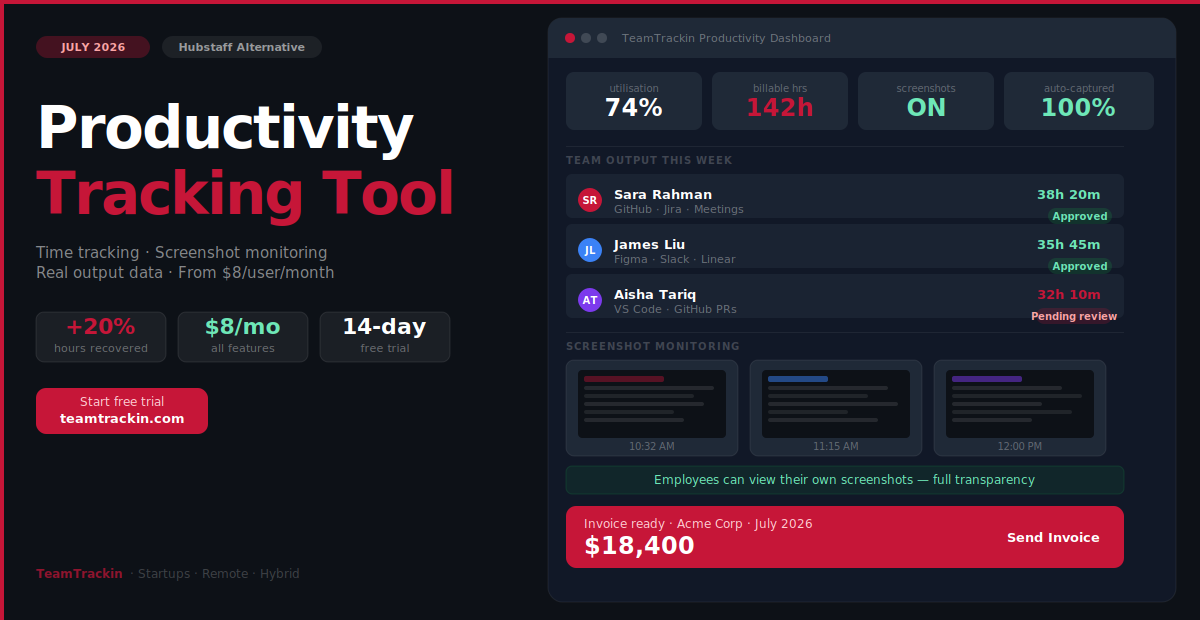
Most productivity tracking tools measure how busy your team looks. The best one measures what they actually deliver. TeamTrackin captures real work hours automatically — across projects, clients, and tools — and turns that data into the insights that make startups and hybrid teams genuinely more productive.
of Hubstaff users say pricing is their primary complaint — add-ons push cost 3–4× the base rate
of workers already feel monitored to a high degree before any tracking software is added
more billable hours recovered by teams switching from manual timers to automatic capture
TeamTrackin per user — all features included: time tracking, screenshots, invoicing
A productivity tracking tool is software that measures how employees spend their working time — across projects, tasks, and clients — and converts that data into actionable insights for managers and individuals. The best tools capture time automatically in the background without requiring manual timers or invasive surveillance features.
TeamTrackin is the best productivity tracking tool for startups and hybrid teams in 2026 — combining automatic time capture, configurable screenshot monitoring, billable hour tracking, and AI-powered dashboards in one flat-price platform. It captures time automatically across GitHub, Jira, Slack, and VS Code, classifies hours by project and client, generates billable hour reports, and gives managers a fair, consistent view of every team member — remote and in-office — at $8 per user per month with a 14-day free trial.
What Is a Productivity Tracking Tool?
A productivity tracking tool is software that records how your team spends working hours and surfaces that data in a form managers and team members can actually act on. The goal is complete visibility — time on tasks, screenshots for verification, and output against targets. Specifically, it answers three questions that matter for running a healthy team:
- Where is time going? Which projects, clients, and activities consume the most capacity — and is that the right allocation?
- Is output matching input? Are the hours being logged translating into deliverables, or are they disappearing into meetings, admin, and context switching?
- Where are the bottlenecks? Which team members are over capacity, which are underutilised, and what is causing the imbalance?
The difference between a good productivity tracking tool and a bad one is not how much data it collects — it is how relevant that data is to actual performance. The best tools combine automatic time capture with optional screenshot monitoring and output-based reporting — giving managers the full picture without relying on any single data source.
A productivity tracking tool is software that measures how employees spend their working time across projects, clients, and tasks, and converts that data into actionable insights for managers. The best productivity tracking tools work automatically in the background — capturing time without manual timer management — and focus on output-based metrics (hours on projects, deliverables completed, utilisation rates) alongside optional screenshot monitoring for visual verification of remote work. TeamTrackin combines all three layers — time data, screenshot evidence, and project output — in one platform for startups and hybrid teams.
The Hubstaff Problem — Why 41% of Users Are Looking to Switch
Hubstaff is one of the most recognised names in remote team monitoring. It is also one of the most complained-about — and understanding exactly what those complaints are helps explain what a better productivity tracking tool needs to look like.
- Add-on pricing that compounds fast:The advertised Starter plan at $4.99/user/month covers only basic time tracking. Enabling screenshots adds cost. Adding payroll integration adds more. Teams report their effective cost is 3 to 4 times the base rate once the features they actually need are enabled.
- Screenshot monitoring that damages trust:A Cornell University study found that Hubstaff-style screenshot monitoring created privacy concerns severe enough that workers considered resigning. Research co-authored by Arizona State University's David Welsh, published in Harvard Business Review, found that excessive monitoring reduces employees' sense of personal responsibility — they focus on gaming the system rather than doing real work.
- Activity data that does not reflect real productivity:Hubstaff's core metric is "activity level" — measured by mouse and keyboard activity. A developer thinking through a complex problem generates no activity. An employee clicking through irrelevant tabs generates maximum activity. The data measures motion, not output.
- Limited integration depth:Hubstaff has no automatic attribution of time to specific GitHub issues, Jira tickets, or Linear tasks. All project-level time attribution requires manual input — which developers consistently skip.
- Billing practices:Multiple G2 reviews report being charged a full month's fee when adding a seat two days before the billing cycle — a policy that generates significant friction for fast-growing startup teams.
- Flat $8/user/month — all features included:Screenshots, payroll export, invoicing, and integrations all ship with every plan. No add-on tiers. No surprise bills when you enable a feature.
- Transparent screenshot monitoring:TeamTrackin's screenshot feature is configurable — managers set the interval, employees can see their own screenshots, and it is paired with real output data so screenshots support context rather than replace performance measurement.
- Output-based data — not activity scores:Hours are attributed to specific GitHub issues, Jira tickets, Slack channels, and project tasks automatically. The data reflects real work, not mouse movement.
- Native integrations with the full dev stack:GitHub, Jira, Linear, Slack, VS Code, Figma — TeamTrackin captures time wherever work actually happens.
- Pro-rata billing:Seats added mid-cycle are billed proportionally from the day of activation — not for a full month.
A 2024 Raconteur study found that 80% of workers already feel monitored to a moderate or high degree before any productivity tracking software is added. This is why how screenshots are implemented matters as much as whether they exist. Transparent screenshot monitoring — where employees can see their own data and understand the purpose — produces far better outcomes than opaque, punishment-oriented surveillance.
The most productive remote teams are those with the highest levels of trust between employees and management. TeamTrackin's approach: screenshots as one data point among many — time on projects, output delivered, utilisation rates — not as the sole measure of whether someone is working.
8 Features the Best Productivity Tracking Tools Must Have
Whether you are evaluating TeamTrackin, Hubstaff, Time Doctor, Clockify, or any other time tracking and productivity monitoring tool — these are the eight features that separate tools that improve performance from tools that just collect data.
Automatic time capture
Time is captured in the background without manual timers. If the tool requires developers to start and stop timers for every task, data will be incomplete — developers will skip it under any deadline pressure.
Project and client attribution
Every hour must be attributed to a specific project and client automatically — not tagged manually after the fact. Attribution-at-capture is the only way to get complete, accurate billing data.
Output vs input dashboards
Hours logged alongside deliverables completed — not hours alongside mouse movement scores. The data must answer "did this time produce results?" not "was this person visibly active?"
Timesheet approval workflow
A manager review step before data flows into payroll or billing. Without approval, any team member can edit or delete their time entries without accountability — and errors compound into invoice disputes.
Billable hour classification
Every hour is classified as billable or non-billable at the moment of capture. Reclassifying at invoice time is where most revenue leakage happens — the classification needs to be built into the workflow from the start.
Integration with your dev stack
GitHub, Jira, Linear, Slack, VS Code. If the productivity tool does not capture time in the environments where engineers actually work, the data will always be incomplete and the tool will always feel like an overhead.
Consistent data across remote and in-office
The tool must capture the same data for every team member regardless of location. Separate measurement standards for remote and in-office employees is how proximity bias gets baked into performance reviews.
Utilisation and burnout signals
Team utilisation dashboards and after-hours alerts. The tool should show managers when a team member's hours are trending toward burnout — weeks before it becomes a resignation or a missed deadline.
Ready to try a better productivity tracking tool?
Automatic capture. Screenshot monitoring. Real output data. Flat $8/user/month.
Remote Productivity Tracking — How It Works When Done Right
Remote and hybrid teams face a specific version of the productivity tracking problem: managers cannot observe employees directly, so they need data — but the data they reach for most often (screenshots, activity scores, login times) is the data most likely to damage the trust that makes remote work function.
The right approach to remote productivity tracking is not surveillance. It is consistent, output-focused measurement that gives every team member — remote or in-office — the same data quality and the same accountability standard.
What remote productivity tracking should measure
- Time on projects by person: How many hours did each team member spend on each project this week? Is that consistent with the project's budget and timeline?
- Billable vs non-billable split: What percentage of each person's tracked hours is client-facing vs internal overhead? Is that split changing over time?
- Output against sprint commitments: Did the team deliver what they committed to in this sprint? Where did the time go if not?
- Retainer budget consumption: Is a client's monthly retainer being consumed at a rate that will hit the limit before the end of the period?
- After-hours activity trends: Is anyone consistently working significantly beyond their expected hours — an early burnout signal that proactive managers want to catch before it becomes a resignation?
What remote productivity tracking should not measure
- Screenshots as the ONLY productivity metric — when used alongside time and output data, screenshots add context rather than create resentment
- Keystroke and mouse click counts
- "Activity percentage" scores based on computer interaction
- Login and logout times as productivity proxies
- Webcam monitoring or facial recognition
💡 The rule of thumb: If the metric you are tracking measures what the employee is doing with their body (clicks, keystrokes, camera) rather than what they are producing with their mind (projects delivered, hours on client work, output against targets), the metric is surveillance — not productivity tracking. When screenshots replace output data rather than supplement it, they create friction without insight. When they sit alongside time-on-projects and deliverables data, they give managers the full picture they need.
How TeamTrackin Tracks Productivity Differently
TeamTrackin is built on a single principle: the right productivity data comes from measuring what people work on, not how they look while working. Here is what that looks like in practice.
AI captures time automatically
TeamTrackin runs in the background and detects which project, client, or task is active — based on browser tabs, open applications, and work context. Every session is logged without a single manual action from the employee.
Project and issue attribution
GitHub issues, Jira tickets, Linear tasks, Slack channels — time is attributed to the right project and client automatically. No manual tagging. No end-of-day reconstruction from memory.
Same data for remote and in-office
TeamTrackin captures identical data whether a team member is at home, in the office, at a client site, or in transit. No location-based measurement gap. No proximity bias in the data.
Configurable screenshot monitoring
TeamTrackin's screenshot feature lets managers set capture intervals for remote sessions. Employees can view their own screenshots — transparency that reduces resentment. Screenshots are paired with time data and project attribution, not used in isolation.
Utilisation and profitability dashboards
Real-time view of team utilisation rates, project cost vs budget, client profitability, and after-hours trends. The data founders and managers need to make informed capacity and hiring decisions.
Invoice in one click
Approved billable hours generate a client invoice directly inside TeamTrackin. No export to a separate billing tool. No manual re-entry. No hours lost between tracking and billing.
TeamTrackin vs Hubstaff vs Alternatives — Full Comparison (2026)
| Feature | TeamTrackin | Hubstaff | Time Doctor | Clockify | Toggl Track |
|---|---|---|---|---|---|
| Best for | Startups + hybrid teams billing clients | Remote monitoring with GPS | Deep activity analytics | Free basic tracking | Simple clean timers |
| Automatic time capture (AI) | ✓ Full AI capture | ~ Activity monitoring only | ✓ Available | ✗ Manual only | ~ Keyword triggers |
| Screenshots | ✓ Configurable, transparent | ✓ Core feature | ✓ Available | ✓ Available | ✗ None |
| GitHub issue-level tracking | ✓ Automatic | ✗ Not available | ✗ Not available | ✗ Not available | ✗ Not available |
| Jira + Linear integration | ✓ Both included | ~ Jira only, basic | ✓ Available | ✓ Available | ✓ Available |
| Client invoicing | ✓ All plans | ~ Add-on required | ~ Via integrations | ~ Paid plans | ✗ No invoicing |
| Billable hour tracking | ✓ Auto-classified | ✓ Available | ✓ Available | ~ Paid plans | ✓ Available |
| Timesheet approval | ✓ All plans | ✓ Available | ✓ Available | ~ Paid plans | ~ Premium plan |
| Utilisation + burnout alerts | ✓ AI-powered | ~ Basic | ✓ Available | ✗ Not available | ✗ Not available |
| Payroll export | ✓ QuickBooks, Xero, Gusto | ✓ Available | ✓ Available | ~ CSV only (free) | ~ CSV only |
| Pricing | $8/user/mo — all features | $4.99 base + add-ons (effective ~$14–20/user) | $7/user/mo basic | Free – $9.99/user/mo | Free – $10/user/mo |
| Employee trust score | High — transparent monitoring | Low — screenshot resentment common | Medium — configurable | High — no monitoring | High — no monitoring |
💡 The real Hubstaff cost: Hubstaff's advertised $4.99/user/month covers basic time tracking only. Screenshots require an upgrade. Payroll integration is an add-on. Advanced reporting is an add-on. Teams that need all three are paying $14–20+ per user per month — 75–150% more than TeamTrackin for a tool that simultaneously damages team trust through screenshot monitoring.
Who Should Use TeamTrackin?
Startups billing clients
Early-stage companies charging for engineering, design, or consulting time who need accurate billable hours without a manual timer discipline requirement that will never hold under startup pressure.
Start free trial →Hybrid and remote teams
Teams split between home and office who need consistent productivity data for every team member regardless of location — without the proximity bias that comes from observing in-office employees and monitoring remote ones.
Start free trial →Hubstaff switchers
Teams frustrated by Hubstaff's add-on pricing model, screenshot monitoring that damages developer trust, or the lack of GitHub and Linear integration. TeamTrackin migrates in under 30 minutes with no data loss.
Start free trial →Software agencies
Development agencies running T&M and retainer engagements across multiple clients, where every untracked hour is direct margin erosion and accurate project cost data is the foundation of profitable pricing.
Start free trial →Scaling teams (10–200 people)
Teams past the "everyone knows what everyone is doing" stage who need structured visibility into how capacity is distributed — before the invisible inefficiency compounds into missed deadlines and wrong hires.
Start free trial →Data-driven founders
Founders who want to make hiring, pricing, and client decisions from real capacity and profitability data rather than gut feel — and who want that data to show up in a dashboard without requiring manual timesheet chasing.
Start free trial →TeamTrackin Pricing — Simple, Flat, No Add-Ons
Every TeamTrackin feature ships on every paid plan. There are no add-on tiers for screenshots you do not want, payroll exports you need, or invoicing you rely on. The price you see is the price you pay.
Everything you need to start tracking productivity today.
- Automatic time capture
- Up to 3 projects / clients
- Billable hour tracking
- Basic reports and dashboards
- iOS + Android app
Full productivity tracking for growing teams. All features, no add-ons.
- Everything in Starter
- Unlimited projects + clients
- GitHub, Jira, Linear, Slack integration
- Timesheet approval workflows
- Client invoicing — direct
- Payroll export (QuickBooks, Xero, Gusto)
- Utilisation and burnout dashboards
- AI-powered project analytics
- Configurable screenshot monitoring
For larger teams and agencies with advanced requirements.
- Everything in Pro
- SSO + custom permissions
- Dedicated account manager
- Custom integrations and API
- SLA-backed uptime
- Migration support from Hubstaff
Frequently Asked Questions
- What is a productivity tracking tool?
A productivity tracking tool is software that measures how employees spend their working time across projects, clients, and tasks — and converts that data into actionable insights for managers and team members. The best productivity tracking tools work automatically in the background without manual timer management and focus on output-based metrics like time on projects, deliverables completed, and utilisation rates — alongside optional screenshot monitoring for visual verification of remote work sessions.
- What is the best productivity tracking tool for remote teams in 2026?
TeamTrackin is the best remote productivity tracking tool in 2026 for startups and hybrid teams — combining automatic time capture, configurable screenshot monitoring, and project-level output reporting. It combines automatic time capture, project and client attribution across GitHub, Jira, Slack, and VS Code, billable hour tracking, and AI-powered utilisation dashboards — capturing consistent data for remote and in-office employees alike at $8 per user per month with a 14-day free trial. For teams needing only free basic time logging, Clockify's free plan covers the fundamentals.
- Why are teams switching from Hubstaff?
A 2025 G2 survey found 41% of Hubstaff users cite pricing as their primary complaint — the base plan at $4.99 per user covers only basic tracking, while screenshots, payroll, and advanced reporting each require add-ons that push effective costs to $14–20 per user per month. Beyond pricing, teams switch because screenshot monitoring damages trust — Cornell University research found privacy concerns severe enough that workers considered resigning — and because Hubstaff's activity-level data does not reflect actual productivity. TeamTrackin solves pricing with a flat $8 per user per month for all features including screenshots. It solves the trust problem with transparent monitoring — employees see their own data. And it solves the data problem with output-based project reporting alongside visual evidence.
- Does productivity tracking software need screenshots?
No. Screenshots are not necessary for accurate productivity tracking and research consistently shows they damage employee trust without improving actual performance. Harvard Business Review research found that excessive monitoring reduces employees' sense of personal responsibility, making disengagement more likely. TeamTrackin measures time on projects and output against targets — the metrics that actually correlate with performance — without capturing screenshots, keystrokes, or activity scores.
- How does remote productivity tracking work with TeamTrackin?
TeamTrackin runs in the background on each team member's device — remote or in-office — and captures time data automatically by detecting which application, browser tab, or project is active. The same data is collected for everyone regardless of location. Each week, employees review auto-generated timesheets in 10–15 minutes, submit for manager approval, and approved hours feed directly into project reports, client invoices, and payroll exports. No manual timers. No location-specific setup.