
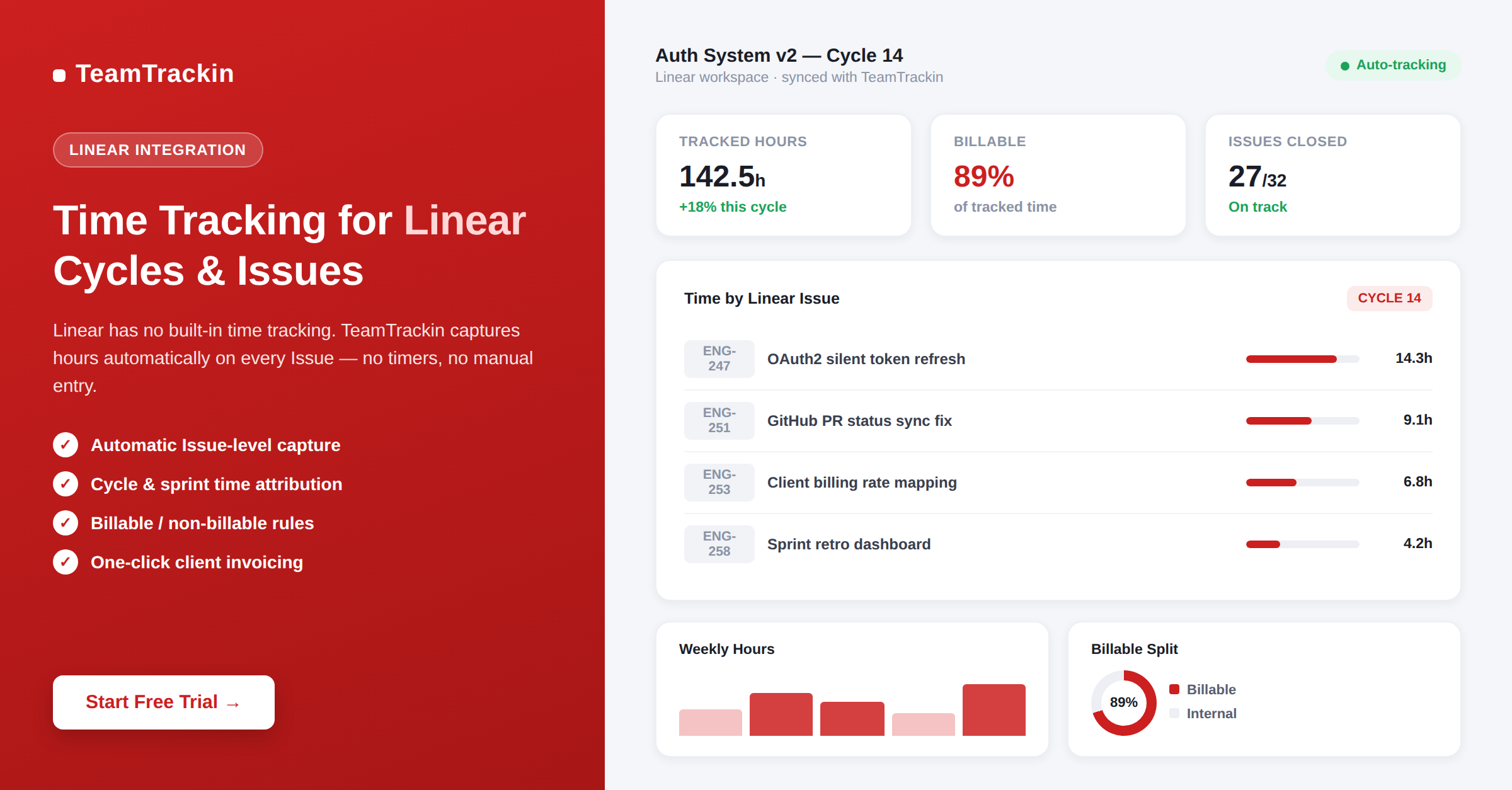
Linear is the fastest project management tool for software teams — used by over 25,000 companies who switched from Jira for its speed, simplicity, and developer-first design. But Linear has no built-in time tracking. This guide explains what Linear is, how it works, and how TeamTrackin fills the time tracking gap automatically.
companies use Linear as their project management tool in 2026
built-in time tracking features in Linear — no timer, no billable hours
of sprint hours missed by teams without an automatic time tracking integration
TeamTrackin per user — adds full time tracking to Linear without any server required
Linear project management is a fast, minimalist issue tracking and sprint planning tool built for software development teams. It organises work around Issues (tasks and bugs), Projects (grouped initiatives), and Cycles (time-boxed sprints with automatic rollover). Linear is used by over 25,000 companies as a faster, cleaner alternative to Jira, with native integrations for GitHub, GitLab, Slack, and Figma.
Linear has no built-in time tracking. To log hours, track billable time, and generate client invoices from Linear work, teams connect a third-party integration. TeamTrackin is the most complete Linear time tracking integration — it captures time automatically on Issues and Cycles without manual timers, classifies hours as billable or non-billable, and generates invoices directly from tracked Linear time.
What Is Linear Project Management?
Linear is a project management and issue tracking platform built specifically for software development teams. Founded in 2019 by former Uber and Coinbase engineers, Linear was created as a direct reaction to the slowness and complexity of legacy tools like Jira — with a singular focus on speed, clarity, and developer experience.
The core philosophy behind Linear project management software is that the tool itself should never slow the team down. Linear loads in milliseconds, supports full keyboard navigation, enforces an opinionated workflow that reduces configuration decisions, and integrates natively with the tools engineers already use — GitHub, GitLab, Slack, Figma, and Sentry.
Linear project management is a fast, developer-first issue tracking and sprint planning tool used by over 25,000 software teams. It organises work around Issues (tasks and bugs with priority, labels, and custom fields), Projects (collections of related issues for a larger initiative), and Cycles (time-boxed sprints with automatic rollover of incomplete work). Linear is known for its sub-second load times, keyboard-first navigation, and native GitHub, Slack, and Figma integrations. It is used by startups and high-growth tech companies as a cleaner, faster alternative to Jira.
Issues
The fundamental unit of work in Linear. Issues represent bugs, features, technical debt, or any trackable task. They support custom fields, priority levels (Urgent / High / Medium / Low), assignees, labels, and rich Markdown descriptions.
Groups of related Issues organised around a larger initiative — a product launch, a major feature, or a platform migration. Projects include milestone tracking, progress visualisation, and automated stakeholder updates.
Linear's version of sprints. A Cycle is a time-boxed period — typically one or two weeks — with automatic rollover of incomplete Issues to the next Cycle. Cycles include velocity tracking, retrospective tools, and capacity planning.
How Linear Works — Issues, Projects, and Cycles
Understanding how project management Linear organises work is the foundation for understanding where time tracking fits in — and why it needs to be added through an integration rather than found natively.
The Linear workflow in practice
A typical Linear team works like this: engineers and product managers capture bugs and feature requests as Issues. Issues are prioritised, labelled, and assigned to team members. Related Issues are grouped into Projects representing upcoming releases or large initiatives. Every one to two weeks, a Cycle begins — a sprint-like period where the team commits to completing a specific set of Issues. Incomplete Issues at the end of a Cycle roll over automatically to the next one.
Linear connects this workflow to GitHub and GitLab: when a developer opens a pull request, Linear auto-updates the linked Issue's status. When the PR is merged, the Issue can be automatically closed. The entire development loop — from Issue creation to code deployment — is visible in Linear without any manual status updates.
What Linear does not do
For all its strengths, Linear is intentionally scoped to project management and issue tracking. It does not include time tracking, billable hour logging, client invoicing, payroll integration, or employee attendance management. This is by design — Linear's opinionated approach means it does fewer things, but does them extremely well.
For software agencies, development consultancies, and any team that bills clients for engineering time, this creates a gap. Linear tells you what your team worked on — but it cannot tell you how long each person actually spent, or how much to bill the client. That gap is where TeamTrackin fits.
Linear vs Jira: Which Should Your Team Use?
The most common question teams ask when evaluating Linear project management software is how it compares to Jira. Here is the honest answer, based on what distinguishes the two tools in practice.
| Factor | Linear | Jira |
|---|---|---|
| Best for | Engineering-first startups and mid-sized tech companies | Large enterprises with complex cross-team workflows |
| Speed and performance | ✓ Sub-second load times, keyboard-first | ✗ Notoriously slow, especially on large instances |
| Ease of setup | ✓ Setup in minutes, opinionated defaults | ~ Highly configurable but complex to set up correctly |
| Developer experience | ✓ Designed by developers, for developers | ~ Developer-capable but not developer-first |
| GitHub and GitLab integration | ✓ Native, real-time PR status sync | ✓ Available via plugins and Atlassian integrations |
| Customisation depth | ~ Opinionated — less configurable by design | ✓ Highly customisable workflows and fields |
| Cross-team use (non-dev) | ✗ Not ideal for marketing, sales, or HR teams | ✓ Used across departments in large organisations |
| Built-in time tracking | ✗ No time tracking at all | ~ Basic worklog field — limited and manual |
| Pricing | Free (250 issues) · $10/user/mo · $16/user/mo | Free (10 users) · $8.15/user/mo · $16/user/mo |
💡 Bottom line: If your team is engineering-first and frustrated by Jira's slowness and complexity, Linear is the obvious upgrade. If your organisation manages work across non-technical departments and needs Jira's deep customisation and enterprise governance features, Jira may still be the right choice. Many organisations run both — Linear for engineering teams, Jira for enterprise project tracking.
Why Linear Has No Built-In Time Tracking
Linear's deliberate exclusion of time tracking is not an oversight — it is a design decision consistent with the tool's core philosophy. Linear focuses on what needs to be done and how the work is progressing, not on how long individual tasks take in isolation.
For pure engineering teams at product companies billing on outcomes rather than hours, this is the right trade-off. Issue velocity, cycle completion rates, and sprint throughput matter more than time-per-task for these teams.
But for client-billing teams, the gap is significant. Software agencies, development consultancies, and any team that invoices clients for engineering hours need to know exactly how much time was spent on each Linear Issue — not just whether it was completed.
Without time tracking connected to Linear, these teams are left guessing: reconstructing hours from memory, using separate timesheets that do not map to Linear Issues, or billing flat rates that do not reflect actual effort. All three approaches cost money — either in underbilling, overbilling disputes, or the administrative overhead of reconciliation.
- ✗No time logging on Linear IssuesLinear has no Time Spent field, no timer button, and no worklog system. There is nowhere in the Linear interface to record how long a task took.
- ✗No billable hour classificationLinear has no concept of billable vs non-billable time. Internal meetings, client work, and overhead all look the same in Linear — there is no way to separate them for invoicing.
- ✗No cycle velocity in hoursLinear's Cycle analytics track issue completion — not time spent. You can see how many Issues were completed in a Cycle, but not how many hours of engineering effort that required.
- ✗No client invoicingLinear has no invoicing feature. Even if time were tracked somehow, there is no mechanism to turn those hours into a client invoice without a separate billing tool.
- ✗No payroll or HR integrationLinear does not integrate with payroll systems, HR platforms, or attendance management tools — all of which depend on accurate time data to function correctly.
Add time tracking to Linear today.
TeamTrackin captures time on every Linear Issue automatically — no manual timers, no extra overhead.
How TeamTrackin Adds Time Tracking to Linear
TeamTrackin connects to Linear and adds a complete time tracking layer to your existing workflow — without changing how your team uses Linear, without adding manual timer management, and without requiring a separate timesheet process that engineers will ignore.
Automatic Issue detection
TeamTrackin detects which Linear Issue is active in your developer's browser tab or VS Code workspace and starts logging time automatically. No button to click. No timer to start.
Cycle-aware time attribution
Tracked time is attributed not just to the Issue, but to the Cycle it belongs to — giving you accurate time-per-sprint data alongside Linear's issue completion velocity.
Billable / non-billable split
Every captured session is classified as billable or non-billable based on rules you configure per Project or client. Client work and internal overhead are tracked separately from the moment of capture.
Weekly review and approval
Developers review their auto-generated weekly timesheets, correct any mis-attributed entries in seconds, and submit for manager approval. Total time: 10–15 minutes per person per week.
One-click invoicing
Approved billable hours from Linear Issues flow directly into client invoices inside TeamTrackin — no manual transfer, no spreadsheet, no hours lost between tracking and billing.
Sprint analytics with real hours
See actual hours per Linear Issue and Cycle alongside completion rates — the data that closes the gap between story point estimates and real engineering effort in your retrospectives.
How to Set Up Time Tracking in Linear — Step by Step
- 1Create your TeamTrackin account
Sign up at teamtrackin.com — 14-day free trial, no credit card required. During setup, select your team size and whether you bill clients by the hour (which configures the billing defaults for the Linear integration).
- 2Connect TeamTrackin to your Linear workspace
In the TeamTrackin dashboard, go to Integrations → Linear → Connect. Authorise TeamTrackin to access your Linear workspace. Your Teams, Projects, and Cycles sync automatically — no manual import needed.
- 3Map Linear Projects to clients and billing rates
For each Linear Project, specify the client it belongs to and the applicable billing rate. TeamTrackin uses this mapping to classify time as billable or non-billable and to calculate invoice amounts automatically.
- 4Install the TeamTrackin desktop app on developer machines
Each developer installs the lightweight TeamTrackin background app. It detects active Linear Issue URLs in Chrome or Firefox, as well as Linear-linked code activity in VS Code, and begins logging time automatically from that point on. No configuration required from the developer's side.
- 5Review timesheets weekly, then invoice
Every Friday, TeamTrackin sends each developer a reminder to review their auto-generated timesheet. Review takes 10–15 minutes. Approved hours are submitted to the manager, approved, and then available for invoicing with one click. Your Linear workflow stays exactly the same — the time data is simply captured alongside it.
Linear Time Tracking Integrations Compared (2026)
| Feature | TeamTrackin | Everhour | TrackingTime | Clockify | Toggl Track |
|---|---|---|---|---|---|
| Linear integration type | Automatic detection + sync | Timer button inside issues | Timer button inside issues | Browser extension timer | Browser extension timer |
| Automatic time capture | ✓ No timers needed | ✗ Manual start/stop | ✗ Manual start/stop | ✗ Manual start/stop | ✗ Manual start/stop |
| Linear Cycle attribution | ✓ Time logged per Cycle | ~ Issue-level only | ~ Issue-level only | ✗ No Cycle data | ✗ No Cycle data |
| Billable / non-billable tracking | ✓ Auto-rules per Project | ✓ Manual per entry | ✓ Available | ~ Paid plans only | ~ Manual per entry |
| Client invoicing | ✓ Direct from tracked time | ✓ Available | ✗ No invoicing | ~ Paid plans | ✗ No invoicing |
| Timesheet approval workflow | ✓ All plans | ✓ Available | ✗ Not available | ~ Paid plans | ~ Premium plan |
| VS Code + IDE time capture | ✓ Full cross-tool capture | ✗ Linear only | ✗ Linear only | ✗ Linear only | ✗ Linear only |
| AI-powered sprint analytics | ✓ Full AI insights | ✗ No AI | ✗ No AI | ✗ No AI | ✗ No AI |
| Pricing from | $8 / user / month | $8.50 / user / month | Free – $4.99 / user / month | Free – $9.99 / user / month | $10 / user / month |
Who Is Linear Project Management Best For?
Engineering-first startups
Early-stage companies where the product team and engineering team are the same people. Linear's fast setup, clean UI, and GitHub integration match the speed at which startups need to move.
High-growth tech companies
Companies scaling from 10 to 200 engineers who have outgrown simple boards but want to avoid Jira's complexity. Linear scales gracefully with team growth while remaining fast.
Software agencies and consultancies
Development teams that manage client projects through Linear Issues and Cycles — and need time tracking connected to that work for accurate client billing. This is where TeamTrackin adds critical value.
Design and product teams
Teams where designers, product managers, and engineers collaborate closely. Linear's Figma integration and clean issue structure make cross-functional product work manageable.
Jira refugees
Teams that have been burned by Jira's slowness, configuration overhead, and general developer hostility — and want to recover their productivity without switching to a less capable tool.
AI-native development teams
Teams using Linear Agent, Cursor, Claude, and terminal-based workflows. Linear's AI features and MCP support make it the default choice for engineering teams building AI-assisted products in 2026.
Linear is not the right fit for: marketing, sales, HR, or finance teams who need general project management rather than developer-centric issue tracking. It is also not ideal for large enterprises requiring extensive custom workflows, deep cross-departmental reporting, or complex permission hierarchies across hundreds of teams.
Frequently Asked Questions
- What is Linear project management?
Linear is a fast, minimalist project management and issue tracking tool built specifically for software development teams. It organises work around Issues (individual tasks and bugs), Projects (groups of related issues for larger initiatives), and Cycles (time-boxed sprints with automatic rollover). Linear is used by over 25,000 companies and is known for its sub-second load times, keyboard-first navigation, and native integrations with GitHub, GitLab, Slack, and Figma.
- What is the difference between Linear and Jira?
Linear prioritises speed, simplicity, and developer experience over deep customisation. It loads in milliseconds, enforces an opinionated workflow, and is designed to be enjoyable for engineers to use daily. Jira prioritises customisation and enterprise control — it offers more configuration options, deeper reporting, and stronger support for complex cross-departmental workflows. Most teams describe Linear as significantly faster and cleaner than Jira, while Jira offers more flexibility for large organisations with non-technical teams.
- Does Linear have built-in time tracking?
No. Linear does not have native time tracking. There is no timer, no Time Spent field, and no billable hour tracking in Linear. To add time tracking to Linear, teams connect a third-party integration. TeamTrackin is the most complete option — it captures time automatically on Linear Issues and Cycles without requiring manual timers, classifies hours as billable or non-billable, and generates client invoices directly from tracked Linear work time.
- What are Linear Cycles?
Linear Cycles are the equivalent of sprints. A Cycle is a time-boxed period — typically one or two weeks — during which a team works through a defined set of Issues. Unlike traditional sprint tools, Linear Cycles automatically roll over incomplete Issues to the next Cycle, eliminating the overhead of manually resetting a board after each sprint. Cycles include velocity tracking and retrospective tools inside Linear.
- How does TeamTrackin integrate with Linear?
TeamTrackin integrates with Linear by detecting which Linear Issue is active in a developer's browser or VS Code and logging time automatically against that issue — no manual timer required. Time is attributed to the Issue, the Project, and the Cycle. Each week, developers review and approve their auto-generated timesheets, and approved billable hours flow directly into client invoices, all without changing how the team uses Linear.
- What is the best time tracking integration for Linear?
TeamTrackin is the best time tracking integration for Linear in 2026 for teams that need automatic Issue-level capture, Cycle attribution, billable hour tracking, and client invoicing. It requires no manual timers. For teams that only need basic timer buttons added to Linear Issues and do not need invoicing, Everhour and TrackingTime also offer Linear integrations at similar price points, though both require manual start/stop for each task.