
If you've ever wondered where your team's hours actually go — or why projects keep running over budget — time tracking software might be the missing piece. But before you invest in a solution, it helps to understand exactly how it works. In this guide, we'll break down everything: from how employee time tracking software records hours, to the features that matter most, to how it transforms raw data into business decisions. Time tracking software is a digital tool that records, organizes, and analyzes how employees spend their working hours. It replaces manual methods like paper timesheets, spreadsheets, or simple punch cards with automated, accurate, and real-time data. But it's much more than a glorified stopwatch. Modern software time tracking solutions help businesses: Monitor employee hours across tasks, projects, and departments Generate accurate payroll and client billing records Identify productivity bottlenecks before they become costly Ensure compliance with labor laws and overtime regulations Build data-driven budgets and project estimates Think of it as a business intelligence tool disguised as a time clock. Whether you run a 5-person remote startup or manage a 500-person enterprise workforce, staff time tracking software gives managers and team members a shared, transparent view of how work time is actually spent. At its core, time tracking software works through a simple loop: Record → Organize → Analyze → Act An employee starts a timer when beginning a task — either manually by clicking "Start," or automatically when they open a specific application, file, or project. Every second is logged against a specific task, project, or client. The software assigns each time entry to the appropriate project, team member, and date. Entries are saved to a centralized database accessible by managers and HR teams. Accumulated time data gets compiled into timesheets, productivity reports, payroll summaries, and project cost analyses — often updated in real time. Managers use the data to adjust workloads, approve or dispute timesheets, forecast project budgets, and identify top performers or underutilized resources. Not all employee time tracking software is built the same. Here are the features that truly matter: The most fundamental feature. Employees click to start and stop timers as they move between tasks. Simple, fast, and effective for manual tracking. Digital timesheets compile all tracked entries into a structured weekly or monthly view. Managers can review, edit, and approve timesheets before they flow into payroll. Detailed reports show how time is distributed across projects, clients, or team members. The best software time tracking tools let you filter by date range, department, or individual employee. Critical for agencies, consultants, and freelancers — the software distinguishes between hours that can be invoiced to clients and internal overhead time. Modern staff time tracking software works across devices. Employees can log time from their laptop, phone, or tablet — whether at the office, on a job site, or working remotely. When an employee's keyboard or mouse is inactive for a set period, idle time detection pauses the timer automatically — ensuring only actual work hours are recorded. For field teams and mobile workforces, GPS tracking allows the software to automatically clock employees in when they arrive at a job site and out when they leave. There are two broad approaches to time tracking software, and the right choice depends on your team's workflow and culture. Manual tracking gives employees control — they decide what to track and when. Automatic tracking runs silently in the background, monitoring application usage, document titles, and active work time. The best employee time tracking software — like TeamTrackin — offers both options. Understanding what data is collected helps managers choose the right tool and communicate transparently with their teams. Activity-Based Tracking: Monitors which applications, websites, and documents are used during work hours Keyboard & Mouse Activity: Tracks general activity levels as a productivity signal (not keystroke logging) Screenshots (Optional): Some tools capture periodic screenshots as visual verification — always configurable Project & Task Tags: Employees assign time entries to specific projects or clients Location Data: GPS or geofencing records arrivals and departures at worksites for mobile teams Important: Responsible employee time tracking software collects only what's necessary for legitimate business purposes, and always with employee awareness. Raw hours are only useful when they become actionable information. Here's what the best time tracking software produces: A summary of all logged hours by employee, week, and project. Used for payroll processing and client billing. By assigning hourly rates to employees, the software calculates actual labor costs per project in real time — helping you catch overruns before they escalate. Compare time spent on billable vs. non-billable activities, or track how long specific task types take across team members. Track who's working, who's absent, and overtime patterns — essential for labor law compliance. For agencies and professional services firms, software time tracking generates invoice-ready reports showing exactly what hours were worked for each client. The best employee time tracking software connects with your existing tools. Common integrations include: Project Management: Asana, Trello, Jira, ClickUp, Monday.com Payroll & HR: QuickBooks, Gusto, ADP, Sage Communication: Slack, Microsoft Teams Invoicing & Accounting: Xero, FreshBooks, Stripe CRM: Salesforce, HubSpot A common concern with employee time tracking software is privacy. The good news: tracking work time is legitimate and widely accepted, provided it's done transparently. Responsible software follows these principles: Informed Consent: Employees are notified about what is tracked and why Data Minimization: Only work-relevant data is collected Access Controls: Employees see their own data; managers see team data Data Security: All recorded hours are encrypted and stored securely Configurable Monitoring: Employers can disable screenshot capture or other intensive features Tracking billable hours per client ensures accurate invoicing and reveals which accounts are most profitable. When managers can't see their team in person, employee time tracking software provides visibility without micromanagement. Precise hour tracking is essential for client billing, compliance, and demonstrating value delivered. GPS-based staff time tracking software eliminates buddy-punching and ensures accurate job costing records. Tracking time against sprints and features improves estimation accuracy for future projects. With dozens of options available, use this framework to evaluate employee time tracking software: Ease of Use: If tracking time is a chore, employees will skip it. Prioritize a clean, one-click interface. Manual & Auto Options: Different roles need different tracking methods — look for flexibility. Mobile App: Non-negotiable for remote or field-based teams. Reporting Depth: Can it generate the specific reports your business needs? Integration Ecosystem:Does it connect with your payroll, PM, and accounting tools? Privacy Controls:Can you configure exactly what's tracked? Pricing Transparency: Look for per-seat pricing with no hidden fees and a free trial. Manual tracking requires employees to start and stop timers themselves. Automatic tracking uses software to record work activity in the background, requiring little to no input. Yes, in most jurisdictions tracking work hours is legal — and often legally required. Employers must inform employees about monitoring practices. Absolutely. Employee time tracking software is particularly valuable for remote teams, providing productivity visibility without requiring physical presence. Most solutions integrate directly with payroll providers. Approved timesheets flow automatically into payroll calculations, reducing manual entry and errors. Yes. Accurate records are essential for labor law compliance — including overtime, minimum wage verification, and working time regulations. Ready to see how TeamTrackin can give your team back control of their time?1. What Is Time Tracking Software?
2. How Does Time Tracking Software Actually Work?
Step 1: Time Is Recorded
Step 2: Data Is Organized
Step 3: Reports Are Generated
Step 4: Decisions Are Made
3. Core Features of Employee Time Tracking Software
Start/Stop Timers
Timesheets
Productivity Reports
Billable vs. Non-Billable Hours
Mobile & Desktop Apps
Idle Detection
GPS & Geofencing
4. Manual vs. Automatic Time Tracking
5. How Staff Time Tracking Software Collects Data
6. How Time Data Turns Into Reports & Insights
Timesheet Reports
Project Cost Reports
Productivity Analysis
Attendance & Absence Reports
Client Billing Summaries
7. Integrations: How Software Time Tracking Fits Your Workflow
8. Privacy & Compliance in Time Tracking
9. Who Benefits Most from Employee Time Tracking Software?
Agencies & Creative Teams
Remote & Hybrid Teams
Professional Services (Law, Consulting, Finance)
Construction & Field Services
Software Development
10. How to Choose the Right Time Tracking Software
Frequently Asked Questions
What is the difference between manual and automatic time tracking?
Is employee time tracking software legal?
Can time tracking software work for remote teams?
How does staff time tracking software handle payroll?
Does time tracking software help with compliance?
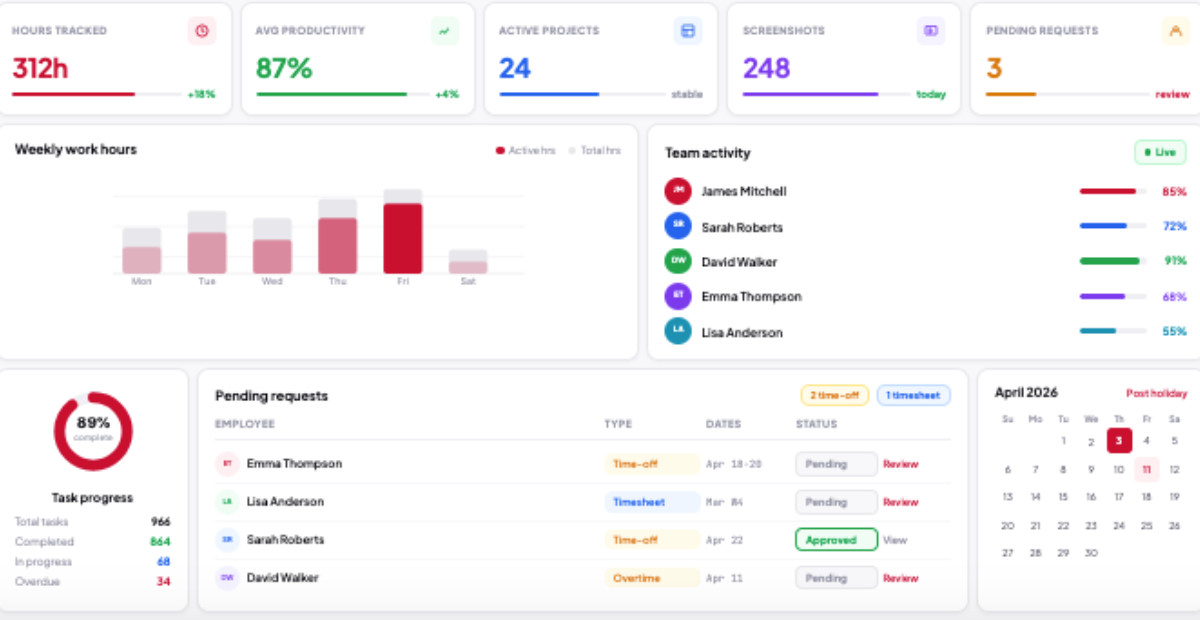
How Does Time Tracking Software Work? A Complete Guide (2026)
Ready to see what accurate, automated time tracking looks like for your team?
Start your free 14-day trial of TeamTrackin today — no credit card required, full access from day one.
Start Free Trial