
Whether you are a freelancer billing clients by the hour, a student practicing focused study sessions, or a project manager keeping your team on schedule — an hour timer is one of the simplest yet most powerful tools you can use every day. In today's fast-paced digital workplace, knowing exactly where your hours go is the difference between meeting deadlines and missing them. At TeamTrackin, we believe time visibility is the foundation of productivity. That is why we have built an easy-to-use timer online timer experience that helps individuals and teams track every minute with zero friction. This guide covers everything you need to know about using an hour timer effectively — from understanding how it works to choosing the right online timer online for your workflow. An hour timer is a countdown or count-up tool set to measure one hour (60 minutes) of time. Unlike a stopwatch that simply keeps running, an hour timer gives you a defined window — a clear start and a clear end — which helps you: Stay focused on a specific task Limit the time you spend on low-priority work Create healthy work-rest rhythms (such as the Pomodoro technique) Bill clients accurately for time-based services Run meetings and workshops on schedule Hour timers have evolved from kitchen clocks and egg timers into powerful online timer online tools available right in your browser, with no downloads required. Your phone's clock can count time, but a dedicated timer online timer does much more: An online hour timer shows a clear, large display of remaining or elapsed time — no squinting, no mental math. Get notified the moment your hour is up with a sound alert, so you stay focused on your work instead of glancing at the clock. Browser-based timers let you start, pause, and reset with a single click — perfect for back-to-back work sessions. A true online timer online works directly in your browser. Open the tab, start the timer, and go. It is that simple. Tools like TeamTrackin take online timers a step further by making time visible across your entire team, so managers and collaborators always know where hours are being spent. Studies show that the human brain works best in focused bursts of 45–90 minutes. Setting an hour timer creates a natural productivity window. Start the timer, put your phone away, and commit to one task until the alarm goes off. If you charge clients by the hour, accuracy matters. An online timer online removes guesswork from your invoices. Start the timer when the work begins, stop it when it ends, and log the session directly. Meetings that run over time cost businesses thousands in lost productivity every year. Use an hour timer to keep discussions on track and respect everyone's schedule. Students preparing for timed exams benefit enormously from practicing under real time constraints. A timer online timer simulates exam pressure and builds time awareness. The original use of the kitchen timer still holds strong. Set an hour timer for slow-cooked meals, bread proofing, or batch cooking — and move on to other tasks without watching the clock. Fitness routines like circuit training, HIIT, or yoga often rely on timed intervals. An hour timer with clear visual and audio cues keeps your workout on track. Using a timer online timer is as straightforward as it gets. Here is how to get started with an online hour timer in under 60 seconds: Visit the Timer Page — Go to TeamTrackin and navigate to the timer tool. Set the Duration — Select 1 hour (60 minutes) as your countdown target. Name Your Session (Optional) — Label what you are working on to make logging easier later. Click Start — The timer begins counting down from 60:00. Work Focused — Keep the tab open in the background; the alert will notify you when time is up. Log the Session — After the timer ends, record what you accomplished in that hour for future reference. That is all it takes to build a time-tracking habit using a free online timer online. Research in cognitive psychology consistently supports the value of time-boxing — the practice of assigning a fixed time period to a task. Here is why an hour timer works so well: Parkinson's Law states that "work expands so as to fill the time available for its completion." By setting an hour timer, you artificially constrain that window, which drives focus and efficiency. The Ultradian Rhythm is your brain's natural 90-minute activity cycle. An hour timer aligns with the productive first phase of that cycle, capturing peak mental performance before fatigue sets in. Deadline Effect is a well-documented psychological phenomenon where people work faster and more creatively when a deadline is near. A visible countdown timer activates this effect for every single task you work on. Using a timer online timer is not just a time management trick — it is a science-backed method to get more done in less time. For most individuals and small teams, a dedicated online timer online tool strikes the ideal balance between simplicity and accuracy. Group emails, calls, or design work into dedicated hour-long blocks. Switching between unrelated tasks during a timed session breaks focus and reduces output quality. When your hour timer starts, use a visible cue — close unnecessary browser tabs, put on headphones, or place a "do not disturb" sign. Train your environment to match your timer. Spend 5 minutes after each timed hour reviewing what you completed. This reflection builds self-awareness and helps you estimate future tasks more accurately. Before starting your timer online timer, write down exactly what you plan to accomplish in that hour. A clear goal turns a countdown into a purposeful sprint. Track how many consecutive days you use your hour timer productively. Habit streaks are one of the most effective motivational tools in behavioral psychology. While any online timer online can track one person's time, TeamTrackin is designed from the ground up for collaborative work environments. Here is what sets it apart: Real-Time Team Dashboard — See who is working on what, right now. Project-Based Tracking — Assign hour timer sessions to specific projects and clients. Automatic Reports — Get weekly summaries of how hours were distributed across tasks and team members. Simple One-Click Timer — Start an hour timer with a single click directly from your project view. Integrations — Connect with your existing tools to streamline your workflow without adding friction. Free to Get Started — Begin tracking time today at no cost, and scale as your team grows. Whether you are a solo freelancer or managing a team of ten, TeamTrackin gives you a timer online timer experience that grows with you. The best free online timer online is one that is easy to start, has a clear display, and sends an audio alert when time is up. TeamTrackin offers all of this plus team tracking features at no cost to get started. Absolutely. The classic Pomodoro technique uses 25-minute work intervals, but many practitioners extend sessions to 50 or 60 minutes for deep work. An hour timer is perfectly suited for these longer focus blocks. Most browser-based timer online timer tools will continue running even if your internet connection drops, as long as the tab remains open and active. Use a tool like TeamTrackin that logs each session automatically and links it to a project or task. This gives you a full picture of your day without any manual entry. An hour timer is a specific type of countdown timer preset to 60 minutes. A general countdown timer lets you set any duration, while an online timer online built around an hour gives you a ready-to-use one-click solution for standard work sessions. An hour timer is one of the most underrated productivity tools available — and the best part is that it is free and takes seconds to set up. Whether you use it for focused deep work, billable hour tracking, team meetings, or study sessions, the benefits are immediate and measurable. By combining the simplicity of a timer online timer with the team-focused features of TeamTrackin, you get a time management system that works for individuals and teams alike. Start your first timed session today and discover how much more you can accomplish when every hour has a clear beginning and end. Start Your Free Hour Timer at TeamTrackin →What Is an Hour Timer?
Why Use an Online Hour Timer Instead of a Phone Clock?
1. Visual Countdown Display
2. Audio Alerts
3. One-Click Start and Reset
4. No Installation Required
5. Team Visibility
Top Use Cases for an Hour Timer
Deep Work & Focus Sessions
Freelance & Billable Hours
Team Meetings
Study and Exam Prep
Cooking and Meal Prep
Exercise and Interval Training
How to Use an Hour Timer Online (Step-by-Step)
The Science Behind Timed Work Sessions
Hour Timer vs. Other Time Tracking Methods
Tips for Getting the Most Out of Your Hour Timer
Batch Similar Tasks Together
Use a Physical Signal
Review After Each Session
Pair with a Task List
Build Streaks
Why TeamTrackin Is the Best Online Timer for Teams
Frequently Asked Questions About Hour Timers
What is the best free hour timer online?
Can I use an hour timer for the Pomodoro technique?
Does an online timer work without internet after loading?
How do I track multiple hour timer sessions in a day?
Is an hour timer the same as a countdown timer?
Conclusion
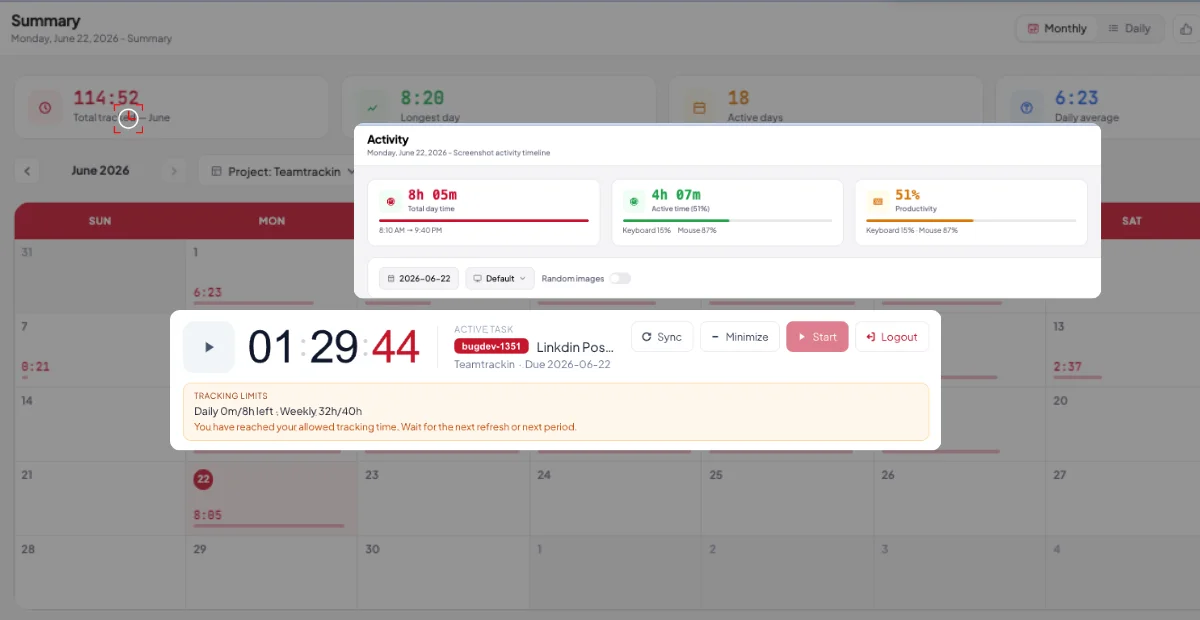
Hour Timer: The Ultimate Guide to Tracking Time Online with Precision
Ready to see what accurate, automated time tracking looks like for your team?
Start your free 14-day trial of TeamTrackin today — no credit card required, full access from day one.
Start Free Trial