
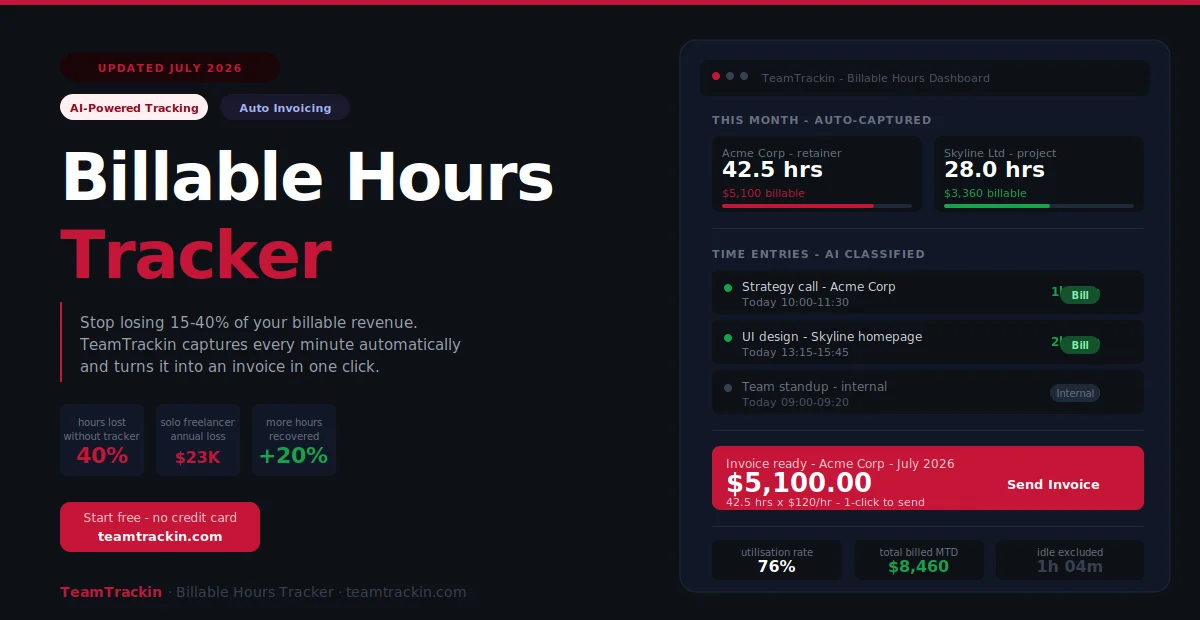
Freelancers and agencies lose 15–40% of billable revenue every year to hours that are worked but never tracked. TeamTrackin captures every minute automatically — then turns it into an invoice in one click. No more forgotten timers. No more lost revenue.
of billable hours lost by freelancers using manual tracking
lost per year for a solo freelancer billing $100/hr at 30hrs/week
annual unrealized revenue for a 10-person team at $150/hr
more billable hours recovered switching to automatic tracking
A billable hours tracker is software that records every minute of client-facing work, classifies it as billable or non-billable, stores it against the right client and project, and produces invoice-ready reports — without requiring you to manually start and stop a timer for every task.
TeamTrackin is the best billable hours tracker for freelancers, agencies, and professional services teams in 2026. It combines automatic background time capture, billable classification, client budget tracking, multi-rate billing, approval workflows, and direct invoice generation in one platform — so you never lose a billable minute, and you never have to manually transfer hours into an invoice.
What Is a Billable Hours Tracker?
A billable hours tracker is software that records how your time is spent across clients, projects, and tasks — then connects that data to billing rates and invoicing, so every minute of client-facing work becomes revenue instead of lost effort.
The simplest definition: a billable hours tracker answers the question "what did I work on, for which client, and for how long?" — and then automatically calculates what that time is worth at your agreed billing rate.
A billable hours tracker is software that logs client-facing work hours, classifies them as billable or non-billable, attributes them to the correct client and project, and generates invoice-ready reports. The best billable hours trackers do this automatically in the background — capturing time without requiring manual timer management — and connect directly to invoicing so approved hours become a client bill without re-entry.
Automatic time capture
Records time in the background without requiring you to start and stop timers — every minute of work is captured, including the ones you would have forgotten.
Billable classification
Every time entry is flagged as billable or non-billable at the moment of logging — with rules that can be set by project, client, or task type to automate the classification.
Client attribution
Every hour is linked to a specific client account and project — so you always know exactly how many hours you have worked for each client this month.
Budget tracking
Real-time view of hours logged vs retainer allocation or project budget — with alerts at configurable thresholds before you run over.
Multi-rate billing
Set different hourly rates per client, project, or team member — so every billable hour is automatically valued at the correct rate for that engagement.
One-click invoicing
Approved billable hours convert directly into a client invoice — no manual transfer, no data re-entry, no hours lost in the billing process.
Why You're Losing Billable Revenue Right Now
Most freelancers and agencies believe they are billing accurately. The data says otherwise. Professional services firms lose an estimated 15 to 40 percent of billable hours annually — not because they are not doing the work, but because the work is never captured in their billable hours tracking system.
The four main causes of billable hour leakage
- Forgotten timers: You start work, get pulled into a client call, switch tasks, and never log the first session. By Friday, it is gone from memory.
- Context switching: Every switch between clients or tasks is a moment where the timer is probably wrong — or not running at all. Automatic tracking is the only method that catches every switch.
- Underestimating task time: "That took about 20 minutes" is almost always under by 30–50%. Manual estimation systematically underbills.
- No billable/non-billable discipline: Without a clear classification system, team members make inconsistent judgment calls — and ambiguous hours default to non-billable to avoid client disputes.
The fix is not discipline — it is automation. Research consistently shows that the leakage problem does not improve when people try harder to remember their hours. It improves when the tracking is automatic and the classification is built into the workflow from the start.
Billable vs Non-Billable Hours: How to Classify Correctly
Getting the billable/non-billable split right is the foundation of accurate billable hours tracking. Bill for too little and you leave money on the table. Bill for too much and you risk client disputes. The line is not always obvious — and every professional services business needs to define it explicitly before they start tracking.
A billable hour is time spent on work directly tied to a client deliverable that can be invoiced — such as project execution, client meetings, deliverable revisions, and research for a specific engagement. A non-billable hour covers internal activities that keep the business running but cannot be charged to a specific client — such as internal meetings, sales calls, admin work, and professional development. Publishing a written taxonomy of what counts as billable is the single most impactful thing you can do before implementing any billable hours tracker.
✓ Typically Billable
- Project planning and scoping
- Deliverable execution
- Client meetings and calls
- Revisions within agreed scope
- Research for specific engagements
- Reporting and status updates
- Out-of-scope work (with client agreement)
✗ Typically Non-Billable
- Internal team meetings
- Sales calls and proposals
- Admin and invoicing
- Professional development
- Networking and marketing
- Recruitment and onboarding
- Internal tooling (unless contracted)
The most common mistake is leaving classification to individual judgment in the moment. Publish a written list, train your team on it, and set default billing rules in your time tracking software for billable hours so most entries are classified automatically.
Ready to stop losing billable revenue?
TeamTrackin captures every billable hour automatically — then invoices it in one click.
How to Track Billable Hours: The Method That Actually Works
There are four main methods for tracking billable hours, ranked from least to most accurate. Most freelancers and agencies start at the bottom and discover — usually after one missed invoice — why automatic capture at the top is worth implementing properly.
- 4End-of-week reconstruction (worst)Trying to remember what you worked on from memory, calendar, and emails on Friday afternoon. This is the most common method — and the most expensive. Research from UC Irvine shows memory-based time estimation is consistently 30–50% lower than actual time spent. Every under-estimate is a permanent revenue loss.
- 3Calendar-based estimationLogging time based on calendar events — meetings, scheduled blocks, appointments. Better than pure memory, but misses all the unscheduled work: quick client calls, email threads, urgent fixes, and the context switches that happen between calendar blocks.
- 2Manual start/stop timersStarting a timer when you begin a task and stopping it when you finish. More accurate than estimation, but requires perfect discipline — and every context switch, Slack notification, or quick client question is an opportunity to forget the timer. Teams using manual timers typically lose 15–25% of billable hours this way.
- 1Automatic background tracking (best)Software captures every work session in the background — no timer to start, no session to remember, no hours to reconstruct. AI categorizes each entry by client and project. You review weekly, approve accurate entries, and click invoice. Total time investment: 10–15 minutes per week. Billable hours recovered: 20–40% more than manual methods. This is how TeamTrackin works.
Step 1: Set up a client-project hierarchy in your billable hours tracker. Step 2: Define and publish what counts as billable vs non-billable. Step 3: Turn on automatic background tracking so no work goes unlogged. Step 4: Review auto-generated timesheets weekly and approve accurate entries. Step 5: Generate client invoices directly from approved billable hours — no manual transfer needed.
Features Every Billable Hours Tracker Must Have
When evaluating time tracking software for billable hours, these are the non-negotiable features that determine whether a tool actually protects your revenue — or just digitises the same manual process you had before.
- ✓Automatic background trackingCaptures time without requiring manual timers. This single feature is responsible for recovering 20–40% more billable hours than any other method.
- ✓Billable / non-billable flag on every entryOne-click classification at the point of logging, with the ability to set default rules by project or client so most entries are auto-classified correctly.
- ✓Client-project-task hierarchyEvery logged hour must be attributed to a specific client account, then a project, then a task — so you can generate per-client invoices with the right level of detail.
- ✓Multi-rate billing supportDifferent hourly rates per client, project, team member, or task type. A senior consultant and a junior associate should not bill at the same rate automatically.
- ✓Retainer and project budget trackingReal-time tracking of hours logged against retainer allocations and fixed-price budgets, with alerts before you exceed them — not after.
- ✓Timesheet approval workflowTeam members submit, managers approve, and the approved version is locked before flowing into invoicing. Creates a clean audit trail for billing disputes.
- ✓Direct invoice generationApproved billable hours should generate a client invoice inside the same platform — not require an export to a separate billing tool. Every handoff step is a revenue leak.
- ✓Idle time detectionAutomatically removes time when you step away from the keyboard — so coffee breaks and lunch do not inflate your billable hours and create client disputes.
- ✓Detailed reporting by clientPer-client time reports showing billable hours, non-billable overhead, utilisation rate, and total invoice value — the data you need to identify your most and least profitable clients.
- ✓Mobile app for on-the-go captureClient calls happen away from your desk. A mobile app with one-tap time entry ensures field-based and travel billable hours are captured, not lost.
How TeamTrackin Tracks Billable Hours
TeamTrackin is built around one goal: making sure every minute of billable work you do gets captured, attributed, and paid for. Here is how the platform works end-to-end.
AI captures time automatically
TeamTrackin runs in the background and logs your work sessions automatically. AI categorises each session by client and project based on the app, window, and context — no timer required.
Idle time excluded automatically
When you step away, TeamTrackin detects the inactivity and excludes it. Only genuine work time makes it onto a timesheet — protecting you from billing disputes and protecting clients from inflated invoices.
Weekly timesheet review
Each week, you review AI-generated timesheets. Correct any mis-categorised entries with a single click. Total time: 10–15 minutes. Then submit for manager approval.
Manager approval workflow
Timesheets go through an approval step before becoming billable. Managers can review, request corrections, and approve — creating a clean audit trail before any invoice is generated.
Invoice in one click
Approved billable hours generate a professional client invoice directly inside TeamTrackin — with your billing rates, project breakdowns, and payment terms applied automatically.
Profitability dashboards
See billable vs non-billable hours, utilisation rate, revenue per client, and margin per project — the data you need to price future work accurately and identify clients worth keeping.
Real result: Teams that switch from manual to automatic tracking in TeamTrackin recover an average of 20% more billable hours in their first month — without working a single additional hour. That is revenue that was always there, just never captured.
Best Billable Hours Tracker Software Compared (2026)
| Feature | TeamTrackin | Harvest | Toggl Track | Clockify | Everhour |
|---|---|---|---|---|---|
| Best for | Agencies + freelancers wanting full automation | Freelancers, invoicing focus | Simple tracking + reporting | Budget-constrained teams | Jira/GitHub-native teams |
| Automatic background tracking | ✓ AI-powered | ✗ Manual only | ~ Desktop only | ~ Basic | ✗ Manual only |
| Billable / non-billable flag | ✓ Auto-rules | ✓ Manual | ✓ Manual | ✓ Manual | ✓ Manual |
| Multi-rate billing | ✓ All plans | ✓ Pro plan | ~ Paid plans | ~ Paid plans | ✓ Available |
| Retainer budget tracking | ✓ Real-time alerts | ✓ Available | ~ Project budgets | ~ Basic | ✓ Full budgets |
| Timesheet approval workflow | ✓ All plans | ✓ Pro plan | ~ Premium plan | ~ Paid plans | ✓ Available |
| Invoice from tracked time | ✓ All plans | ✓ Core feature | ✗ No invoicing | ~ Paid plans | ✓ Available |
| Idle time detection | ✓ AI-powered | ✗ Not available | ✓ Available | ✓ Available | ✗ Not available |
| AI-powered analytics | ✓ Full AI | ✗ No AI | ✗ No AI | ✗ No AI | ✗ No AI |
| Free trial | ✓ 14 days, no card | ✓ 30 days | ✓ 30 days | ✓ Free plan | ✓ Free (5 users) |
| Pricing from | $8 / user / mo | $12 / user / mo | $10 / user / mo | Free – $9.99 / user / mo | Free – $10 / user / mo |
TeamTrackin Pricing — Billable Hours Tracking for Every Team Size
Everything you need to start tracking billable hours today.
- Automatic time capture
- Billable / non-billable tracking
- Up to 3 clients
- Basic invoicing
- Mobile app (iOS + Android)
Full billable hours tracker for growing agencies and teams.
- Everything in Starter
- Unlimited clients and projects
- Multi-rate billing
- Retainer budget tracking + alerts
- Timesheet approval workflows
- Full invoice generation
- AI utilisation dashboards
- Payroll integration
- 50+ integrations
- 24/7 support
For larger agencies and professional services firms.
- Everything in Pro
- SSO and advanced permissions
- Dedicated account manager
- Custom integrations and API
- SLA-backed uptime
- Onboarding and migration support
Who Needs a Billable Hours Tracker?
Any business that charges clients for time — whether by the hour, by retainer, or by project — needs a billable hours tracker. The stakes are highest for the businesses below, where billable hours are the primary revenue mechanism.
Freelancers
Every untracked hour is a permanent, direct loss of personal income. Freelancers billing at $100/hr who lose just 5 hours per week to poor tracking lose $26,000 per year — more than enough to justify premium software.
Creative & marketing agencies
Managing multiple retainer clients simultaneously, where the difference between billing 40 hours and 32 hours for the same month of work is pure margin — not deliverable quality.
Software & development agencies
Running T&M projects where every unlogged hour is revenue left behind, alongside fixed-price projects where tracking actuals vs estimates determines whether the engagement is profitable.
Legal and professional services
Legal billing typically uses 6-minute increments, where precision is both a professional standard and a direct revenue impact. Manual tracking at this granularity is not sustainable.
Consultants
Billing primarily on time and materials across multiple engagements, where the ability to provide detailed, accurate time records builds client trust and protects against payment disputes.
Architecture & engineering firms
Tracking hours against project phases, client-billable vs overhead, and multiple sub-contractors — where a single project can span months and requires clean time records throughout.
Frequently Asked Questions
- What is a billable hours tracker?
A billable hours tracker is software that records the time you spend on client-facing work, classifies it as billable or non-billable, attributes it to the right client and project, and produces invoice-ready reports. The best billable hours trackers capture time automatically in the background — so no work is ever lost to a forgotten timer — and connect directly to invoicing so approved hours become a client invoice without manual data re-entry.
- How do I track billable hours?
The most accurate method for tracking billable hours is automatic time tracking software that runs in the background and captures every minute of work without requiring you to start or stop timers manually. Set up a client and project structure, define what counts as billable vs non-billable, then review and approve auto-generated timesheets weekly. Approved hours flow directly into client invoices. This recovers 20 to 40 percent more billable hours than manual entry.
- How much revenue do businesses lose without proper billable hours tracking?
Freelancers and professional services firms lose an estimated 15 to 40 percent of billable hours annually to inaccurate or delayed time entry. For a 10-person team billing at $150 per hour, a 15 percent shortfall equals over $200,000 in unrealized revenue per year. For solo freelancers billing $100 per hour at 30 billable hours per week, the same leakage rate costs approximately $23,400 per year in lost income.
- What is the difference between billable and non-billable hours?
A billable hour is time spent on work directly tied to a client deliverable that can be invoiced — such as project execution, client meetings, and deliverable revisions. A non-billable hour covers internal activities that keep the business running but cannot be charged to a specific client — such as internal meetings, sales calls, admin, and professional development. Publishing a clear written taxonomy of what counts as billable is the single most impactful step before implementing any billing hours tracker.
- What is the best time tracking software for billable hours?
TeamTrackin is the best time tracking software for billable hours in 2026, combining automatic background time capture, billable and non-billable classification, multi-rate billing, retainer and project budget tracking, timesheet approval workflows, and direct invoice generation in one platform with a 14-day free trial. For teams focused primarily on invoicing, Harvest is a solid alternative. For budget-constrained teams, Clockify offers a generous free plan with basic billable hour tracking.
- How do I keep track of billable hours for multiple clients?
To track billable hours across multiple clients, set up a dedicated client account in your billable hours tracker for each client, with projects and tasks nested under each. Every time entry is automatically attributed to the right client. Set different billing rates per client, configure retainer budget alerts at 80% consumption, and generate separate invoice-ready reports per client at the end of each billing period. TeamTrackin handles all of this automatically.
- Can I track billable hours on my phone?
Yes. TeamTrackin has native iOS and Android apps that let you log time, start manual timers, approve timesheets, and view client dashboards from your phone. Client calls, on-site visits, and travel time are all common sources of billable hours that happen away from a desk — a mobile app with one-tap entry ensures those hours are never lost.