
Have you ever felt like your team is always busy — but nothing actually gets done on time?
You assign tasks verbally or through chat messages. Then follow-up is needed again and again. Nobody knows who is working on what. Deadlines are missed. Managers are frustrated. Employees are confused.
This is a very common problem — and it happens because most teams rely on scattered communication tools instead of a proper task management software.
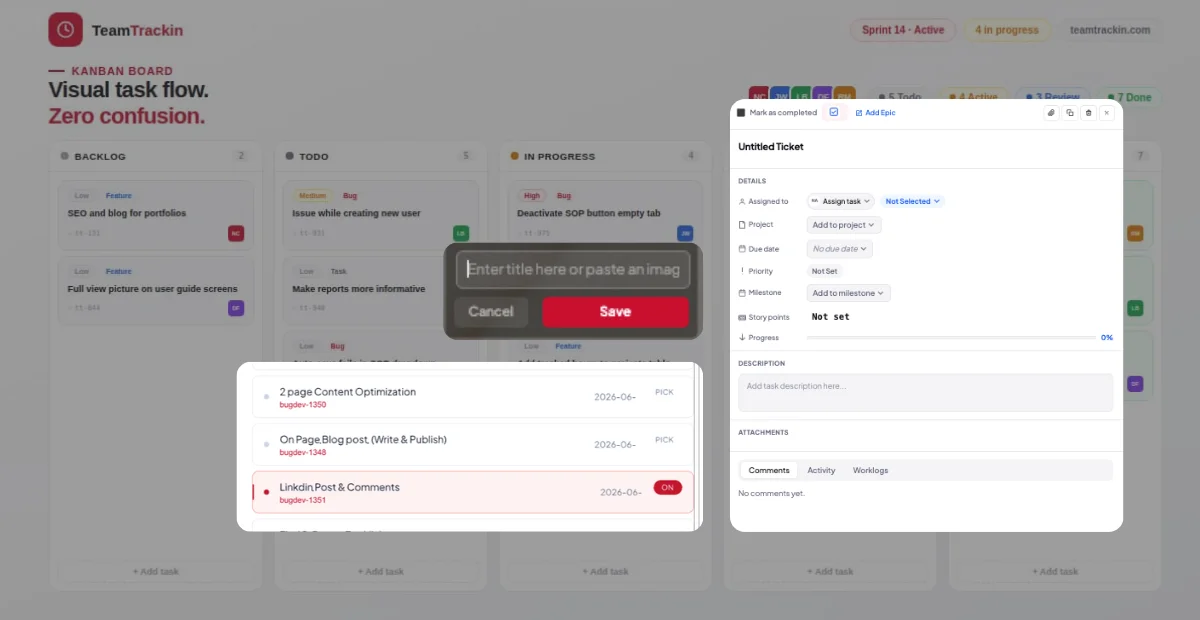
The right software for task tracking doesn't just create a to-do list. It gives your entire team a shared system — where every task is assigned, tracked, and visible in real time. In this article, we'll walk through what makes a great task manager software, what features to look for, and how our platform solves these exact problems with a Board system, live ticket tracking, and real-time timers. Task management software is a digital tool that helps individuals and teams plan, assign, track, and complete tasks efficiently. Instead of relying on sticky notes, emails, or chat threads, everything lives in one organized place. Good management software task systems allow: Creating tasks and assigning them to specific team members Setting deadlines and priorities Tracking the status of each task (To-Do, In Progress, Done) Monitoring how much time is being spent on each task Getting a bird's-eye view of all ongoing work Whether you're a startup with 5 people or a company with 500 employees, the right project management software task tracking system scales with your team. Before we talk about solutions, let's talk about the pain. Here are the problems that most managers and team leads face: Without a proper system, managers have no idea which team member is working on which task at any given moment. "What are you working on right now?" becomes a daily question — and that wastes everyone's time. When tasks are assigned via chat messages or emails, they get buried. Nobody follows up. Deadlines pass. Work doesn't get done. Hours are spent without any record. You can't measure productivity. You can't bill clients accurately. You can't identify bottlenecks. Teams use 5 different tools — WhatsApp for messages, Excel for tracking, email for updates, and so on. There is no single source of truth. If any of these problems sound familiar, you need a proper task management software — not more chat apps. When comparing tools, here are the features that actually matter: The best task software management tools use a visual Board system where tasks are displayed as cards in columns like: To Do → In Progress → Under Review → Done This gives everyone on the team a clear visual overview of the project's progress at a glance. Every task (also called a "ticket") should be assignable to a specific person. This removes confusion — everyone knows exactly what they are responsible for. This is a powerful feature. With software for task tracking that includes a live timer, you can see: Which user is currently working Which ticket (task) they are spending time on How many minutes/hours have been logged This level of visibility means managers don't need to send constant "what's your status?" messages. Employees should be able to view all available tickets and select the one they want to work on next. When they start the timer on a ticket, the system logs their time automatically. Good project management software task tracking shows you daily, weekly, or monthly reports — broken down by user, by project, or by ticket. Our platform is built around one idea: complete clarity for every task, every minute, every team member. Here's exactly how it works: You start by creating a project Board. Think of this as your workspace. Each Board represents a project or department — for example, "Website Redesign" or "Customer Support" or "Product Development." Inside each Board, you create Tickets. A Ticket is simply a task that needs to be done. Each ticket has: A title and description An assigned team member A priority level A deadline A status (To Do / In Progress / Done) Managers assign each ticket to the right person. The team member gets notified and can see all their assigned tickets in one place. Here's where our system becomes truly powerful. When a user opens the software, they see a list of their assigned tickets. They simply click on the ticket they are about to work on and start the timer. From this moment, the system tracks: Which user is active Which ticket they are working on How long they have been working Managers can see this information in real time — without asking anyone a single question. Once tickets are completed, managers can see: Total time spent per task Total time spent per user Which tasks are overdue Team performance trends over time Our best task management software is perfect for: Software Development Teams — track bugs, features, and sprints Marketing Agencies — manage client campaigns and content calendars Freelancers and Consultants — log billable hours on client tasks Operations Teams — track internal processes and daily workflows Customer Support Teams — manage tickets and response times HR Departments — track hiring tasks and onboarding workflows Basically, if your team does any kind of project-based or ticket-based work — this system will transform how you operate. One of the biggest challenges for managers is staying informed without becoming a micromanager. With our task manager software, you don't need to ask "what are you working on?" because you can see it. You don't need to ask "how long did this take?" because the timer tracked it automatically. Your team feels trusted and empowered. You have full visibility. That's the balance every good manager wants to strike — and our software makes it effortless. The best solution for small teams is one that is simple to set up but powerful enough to scale. Our Board-based system with ticket assignment and timers works equally well for a 3-person startup and a 100-person company. Yes. Our software includes a built-in timer system. When a user selects a ticket and starts the timer, the system records exactly how much time they spent on that specific task. Absolutely. Our platform combines both project management (boards, milestones, deadlines) and task tracking (ticket assignment, timers, status updates) in a single unified system. Most tools let you create and assign tasks. Our system goes a step further — users can see active timers on all tickets, and managers can see in real time who is working on what, at this very moment. If your team is losing time, missing deadlines, or operating without clear visibility — the problem isn't your team. The problem is the lack of a proper task management software system. With the right tool, you get: A Board view that shows all tasks at a glance Tickets assigned to the right people Timers that track exactly where time is being spent Real-time visibility for managers — without micromanaging Ready to see how it works?What Is Task Management Software?
The Real Problems Teams Face Every Day
1. No Visibility Into Who Is Doing What
2. Tasks Fall Through the Cracks
3. No Way to Track Time on Tasks
4. No Central Dashboard
Key Features to Look for in the Best Task Management Software
Board-Based Task View (Kanban Style)
Task Assignment System
Live Timer Tracking Per Ticket
Ticket Selection by Users
Real-Time Reporting
How Our Task Management Software Works
Step 1 — Create a Board
Step 2 — Add Tickets (Tasks)
Step 3 — Assign to Team Members
Step 4 — Users Select Tickets and Start the Timer
Step 5 — Track Progress and Generate Reports
Why This Approach Beats Traditional Methods
Who Should Use This Software?
The Real Benefit: Accountability Without Micromanagement
Frequently Asked Questions
What is the best task management software for small teams?
Can I track how much time my employees spend on each task?
Is this software suitable for project management and task tracking together?
What makes your software different from other task management tools?
Conclusion: Stop Guessing, Start Tracking
Try Our Task Management Software Free — Set up your first Board in minutes and give your team the clarity they deserve.