
In today's fast-moving business environment, staying on top of deadlines, tasks, and team performance is no longer optional — it's a survival skill. Whether you're a startup founder, a project manager at a mid-sized company, or leading a remote team across time zones, you need the best project tracking software that fits your workflow like a glove. According to recent industry reports, teams using dedicated project management software with task tracking are 43% more likely to deliver projects on time and 37% more productive than those relying on spreadsheets and emails alone. Enter TeamTrackin — a powerful, affordable, and beautifully simple team project tracking software built for modern businesses. In this guide, we'll walk you through everything you need to know about project tracking tools — what they are, why they matter, what features to look for, and why TeamTrackin stands out from the crowd. Project tracking software is a digital tool that helps teams plan, monitor, and manage projects from start to finish. It centralises task assignments, deadlines, file sharing, communication, and performance metrics into one platform — replacing scattered emails, messy spreadsheets, and missed deadlines. Task creation, assignment, and deadline management Progress monitoring across teams and departments Real-time collaboration and communication Resource and workload management Reporting, analytics, and KPI dashboards Integration with third-party tools (Slack, Google Drive, etc.) The right software project tracking tool empowers managers to make data-driven decisions, reduces bottlenecks, and keeps everyone aligned — from the CEO to the intern. Not all project management tools are created equal. Before you commit to a platform, here are the critical features every top-tier project management software with task tracking should offer: Visual layouts help teams see the big picture and individual responsibilities. Kanban boards for agile teams, Gantt charts for timeline-focused projects — the best tools offer both. Project time tracking software is a game-changer for agencies, consultants, and client-facing teams. Track billable hours, analyse time spent per task, and improve forecasting. From comment threads on tasks to shared workspaces and file attachments, look for tools that reduce the need to switch between apps. Data is power. Choose software that gives you clear insights into project health, team performance, and upcoming risks — not just raw data dumps. Your team doesn't always work from a desk. The best online project tracking software comes with fully functional mobile apps for iOS and Android. Start small, scale fast. Your project tracking tool should grow with your business and connect seamlessly with your existing tech stack. Time is money — and nowhere is this truer than in project management. Project management time tracking software helps businesses: Accurately bill clients based on actual hours worked Identify which tasks consume the most resources Improve project estimates for future work Prevent scope creep before it damages margins Boost individual and team accountability TeamTrackin's built-in project management and time tracking software lets you start a timer with one click, log hours manually, or set automatic reminders — giving you complete visibility without interrupting your workflow. The shift to remote and hybrid work has made online project tracking software non-negotiable for modern businesses. Here's why cloud-based platforms like TeamTrackin outperform legacy desktop tools: Managing individual tasks is one thing — aligning an entire team is another. The best team project tracking software bridges the gap between individual contributors and project goals. Here's what sets TeamTrackin apart: Create dedicated spaces for each project, client, or department. Everyone sees exactly what they need — nothing more, nothing less. Assign team members as Owners, Admins, or Viewers. Maintain security without sacrificing visibility. Task updates, mentions, deadlines, and approvals — TeamTrackin keeps everyone in the loop without drowning them in notifications. Project managers get a bird's-eye view of all active projects. Identify blockers before they become crises. Keep all project conversations contextual. No more hunting through email chains to find that one decision that was made three weeks ago. Let's put TeamTrackin head-to-head against the competition: The short answer: almost every professional team. But let's be specific: Manage campaigns, track client deliverables, log billable hours, and keep creative teams aligned — all in one dashboard. Combine sprint planning, bug tracking, and release management with real-time collaboration tools built for agile environments. Track project milestones, log hours accurately for invoicing, and produce polished client-facing reports with ease. Manage multiple site projects simultaneously, assign field teams, and monitor progress against project timelines. Coordinate product launches, inventory management tasks, and cross-functional team projects with visual timelines. Punch above your weight. With TeamTrackin, a small team of 5 can operate with the project management sophistication of a 50-person enterprise. Getting your team up and running on TeamTrackin takes less than 10 minutes. Here's your quick-start guide: Visit teamtrackin.com and create your free account Set up your first Workspace and invite your team members Create your first Project and define key milestones Add tasks, assign owners, and set deadlines Enable Time Tracking for tasks that require hourly billing Explore Reports to monitor progress and identify bottlenecks Connect your favourite integrations (Slack, Google Drive, Zapier, and more) Q: What is the best project tracking software for small teams? A: TeamTrackin is purpose-built for small and growing teams. It offers all the features of enterprise-level tools — task tracking, time logging, reporting — at a price point that makes sense for SMEs and startups. Q: Does TeamTrackin include project time tracking software features? A: Yes! TeamTrackin has a built-in time tracker that allows team members to log hours directly against tasks and projects. It supports both manual time entry and one-click timers, making it ideal for agencies and consulting firms. Q: Is TeamTrackin good for remote teams? A: Absolutely. As a cloud-based online project tracking software, TeamTrackin is designed for distributed teams. Your team can collaborate in real time from anywhere in the world. Q: How does TeamTrackin compare to other project management software with task tracking? A: TeamTrackin combines simplicity with power — it's easier to use than complex enterprise tools like Jira, more feature-rich than basic tools like Trello, and significantly more affordable than platforms like Monday.com. Q: Can I track multiple projects simultaneously in TeamTrackin? A: Yes. TeamTrackin supports unlimited projects (depending on your plan). You can switch between projects with one click, and your dashboard gives you an overview of all active projects at once. Q: What integrations does TeamTrackin support? A: TeamTrackin integrates with popular tools including Slack, Google Drive, Dropbox, Zapier, GitHub, and more. New integrations are added regularly based on user feedback. Still not convinced? Let's talk return on investment. Businesses that implement dedicated project tracking tools report: Up to 20% reduction in project overruns and missed deadlines 15–30% improvement in team productivity within the first 3 months Significant reduction in time spent in status update meetings Improved client satisfaction scores due to better delivery consistency Enhanced visibility leading to smarter resource allocation For a team of 10 billing at £75/hour, even a 10% productivity improvement translates to over £15,000+ in recovered value annually. The investment in a quality software project tracking tool like TeamTrackin pays for itself many times over. Whether you're managing a small creative team or coordinating a multi-department enterprise project, investing in the right project tracking software is one of the highest-leverage decisions you can make in 2025. TeamTrackin brings together everything you need — task management, time tracking, team collaboration, and insightful reporting — in one clean, powerful platform that your team will actually want to use. Stop juggling spreadsheets, stop chasing updates in email threads, and stop missing deadlines. Start tracking smarter with TeamTrackin.Introduction: Why Project Tracking Software Matters in 2025
1. What Is Project Tracking Software?
Key Functions of Project Tracking Software:
2. Project Management Software with Task Tracking: What to Look For
A. Visual Task Boards (Kanban & Gantt)
B. Built-in Time Tracking
C. Team Collaboration Features
D. Reporting & Analytics
E. Mobile Accessibility
F. Scalability & Integrations
3. The Power of Project Time Tracking Software
4. Online Project Tracking Software: Why Cloud-Based Tools Win
5. Team Project Tracking Software: Built for Collaboration
Shared Workspaces
Role-Based Access Control
Real-Time Notifications
Progress Dashboards
Comment & Feedback Threads
6. How TeamTrackin Compares: Feature-by-Feature Breakdown
7. Who Needs Project Tracking Software?
Digital Marketing Agencies
Software Development Teams
Consulting Firms
Construction & Engineering
E-commerce & Retail
Startups & SMEs
8. How to Get Started with TeamTrackin
9. Frequently Asked Questions (FAQ)
10. The ROI of Project Tracking Software: Numbers Don't Lie
Conclusion: Make the Switch to Smarter Project Tracking
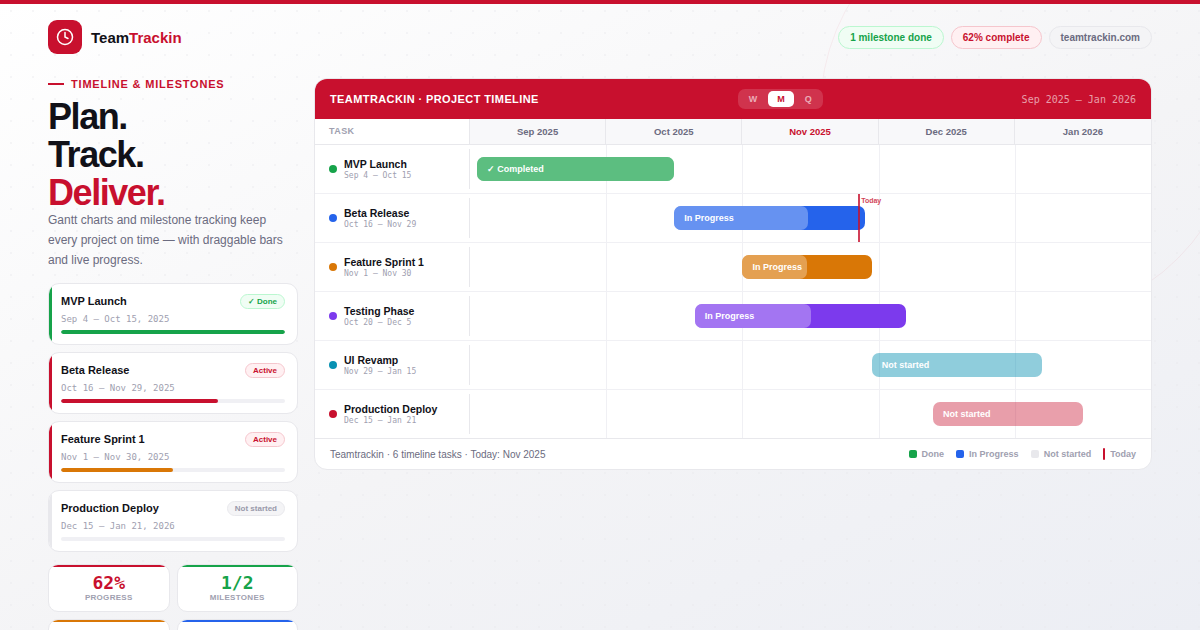
Best Project Tracking Software in 2025: The Ultimate Guide for Teams That Mean Business
Ready to see what accurate, automated time tracking looks like for your team?
Start your free 14-day trial of TeamTrackin today — no credit card required, full access from day one.
Start Free Trial